กรุณาปิด โปรแกรมบล๊อกโฆษณา เพราะเราอยู่ได้ด้วยโฆษณาที่ท่านเห็น
Please close the adblock program. Because we can live with the ads you see


การใส่ไฟล์ ads.txt ใน blogspot

วิธีการทํา การใส่ไฟล์ ads.txt ใน blogspot

Google%2BAdSense_Fix%2Badx_txt%2Bfile.png

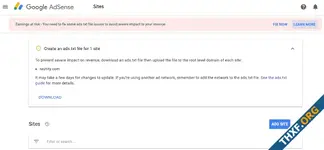
When you sing-in to your Google AdSense. you will see an alert "Earnings at risk - You need to fix some ads.txt file issues to avoid severe impact to your revenue." in your AdSense account. In this post, I'm going to show you how to fix this problem. please follow the steps below to fix the issue.
Google%2BAdSense_Fix%2Badx_txt%2Bfile_blogspot.png

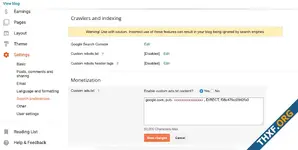
Add your publisher ID to an ads.txt file
  1. Sign in to your Blogger
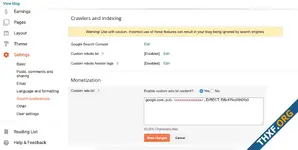
  2. Go to Settings > Search preferences.
  3. Edit Custom ads.txt (Check yes)
  4. Put your publisher ID to the box
  5. Click "Save changes"
เพิ่มรหัสผู้เผยแพร่โฆษณาลงในไฟล์ ads.txt
  1. ลงชื่อเข้าใช้บัญชี AdSense
  2. คลิกแก้ไขเลยในการแจ้งเตือนในหน้าแรก
  3. คลิกลูกศรลง kxcb6MLAfu8hKNjYOoA3euoyQEGc9YiruwUjhzJ9U8=w18-h18.webp เพื่อเปิดข้อความ "เพิ่มรหัสผู้เผยแพร่โฆษณาลงในไฟล์ ads.txt เหล่านี้"
  4. คลิกคัดลอก
  5. วางบรรทัดลงในไฟล์ ads.txt แต่ละไฟล์
    ตอนนี้ไฟล์ ads.txt ควรมีหน้าตาเช่นนี้ โดยที่ pub-0000000000000000 คือรหัสผู้เผยแพร่โฆษณาของคุณเอง
    google.com, pub-0000000000000000, DIRECT, f08c47fec0942fa0


ตั้งค่าไฟล์ ads.txt
หากบล็อกของคุณสร้างรายได้กับผู้ให้บริการบุคคลที่สาม หรือคุณผสานรวม AdSense ไว้ในบล็อกด้วยตนเอง คุณต้องตั้งค่าเนื้อหาของไฟล์ ads.txt เอง
  1. ลงชื่อเข้าใช้ Blogger
  2. คลิกลูกศรลง ที่ด้านซ้ายบน
  3. คลิกบล็อกที่ต้องการตั้งค่าไฟล์ ads.txt
  4. คลิกการตั้งค่าทางด้านซ้าย
  5. ในส่วน "การตั้งค่า" ให้คลิกการตั้งค่าการค้นหา
  6. ในส่วน "การสร้างรายได้" ให้ค้นหา "ads.txt ที่กำหนดเอง" และคลิกแก้ไข
  7. คลิกใช่
  8. คัดลอกการตั้งค่าจากผู้ให้บริการสร้างรายได้บุคคลที่สาม แล้ววางในช่องข้อความ
  9. คลิกบันทึกการตั้งค่า
  10. ไม่บังคับ: หากต้องการตรวจสอบเนื้อหาของไฟล์ ads.txt ให้ไปที่ http://<ที่อยู่บล็อก>/ads.txt
หมายเหตุ: หากบล็อกของคุณไม่ได้สร้างรายได้ หรือกำหนดค่าให้ใช้ AdSense ผ่านการผสานรวม Blogger กับ AdSense คุณก็ไม่จำเป็นต้องตั้งค่า ads.txt เอง เพราะ Blogger จะทำให้คุณ อ่านเพิ่มเติมเกี่ยวกับ ads.txt สำหรับ AdSense


It may take a few days for changes to update. If you're using another ad network, remember to add the network to the ads.txt file.

Reference :
 

ไฟล์แนบ
  • Google%2BAdSense_Fix%2Badx_txt%2Bfile.webp
    Google%2BAdSense_Fix%2Badx_txt%2Bfile.webp
    9.7 กิโลไบต์ · จำนวนการดู: 305
  • Google%2BAdSense_Fix%2Badx_txt%2Bfile_blogspot.webp
    Google%2BAdSense_Fix%2Badx_txt%2Bfile_blogspot.webp
    12.2 กิโลไบต์ · จำนวนการดู: 304
  • kxcb6MLAfu8hKNjYOoA3euoyQEGc9YiruwUjhzJ9U8=w18-h18.webp
    kxcb6MLAfu8hKNjYOoA3euoyQEGc9YiruwUjhzJ9U8=w18-h18.webp
    168 ไบต์ · จำนวนการดู: 264
แก้ไขล่าสุด:


กระทู้ที่คล้ายกัน

  • บทความ บทความ
XenForo 2.3.3 & Add-ons Released XenForo 2.3.3 is now available for all licensed customers to download. We strongly recommend that all customers running previous versions of XenForo 2.3 upgrade to...
ตอบกลับ
3
จำนวนการดู
643
  • บทความ บทความ
XenForo 2.3.2 Released XenForo 2.3.2 is now available for all licensed customers to download. We strongly recommend that all customers running previous versions of XenForo 2.3 upgrade to this...
ตอบกลับ
5
จำนวนการดู
578
  • บทความ บทความ
This week (and a bit) we have been extremely busy working towards that enticing milestone of a stable release. There's still a little while to go with a healthy number of bugs, feedback and other...
ตอบกลับ
0
จำนวนการดู
399
  • บทความ บทความ
Today, we continue the, uh, trend of weekly beta releases for XenForo 2.3 with Beta 4. This release fixes a number of bugs found since the previous release, and adds support for trending content...
ตอบกลับ
0
จำนวนการดู
513
  • บทความ บทความ
vBulletin 5.6.1 Changes and Updates A pre-release version of vBulletin Connect 5.6.1 is now available for download. This version is made available for testing and development purposes only...
ตอบกลับ
0
จำนวนการดู
1พัน

กรุณาปิด โปรแกรมบล๊อกโฆษณา เพราะเราอยู่ได้ด้วยโฆษณาที่ท่านเห็น
Please close the adblock program. Because we can live with the ads you see
กลับ
ยอดนิยม ด้านล่าง