
![[KraiCh] XFRM Version Restore](/data/resource_icons/0/199.jpg?1775563418)
- เวอร์ชัน XF ที่เข้ากันได้
- 2.2
- 2.3
- ข้อกำหนดเพิ่มเติม
- XenForo 2.2.0+
XenForo Resource Manager (XFRM) 2.2.0+
PHP 8.0.0+
# [KraiCh] XFRM Version Restore
Allows moderators and resource owners/team members to restore a previous resource version as the current active version, and to undelete soft-deleted versions — directly from the resource version history page.

## Features
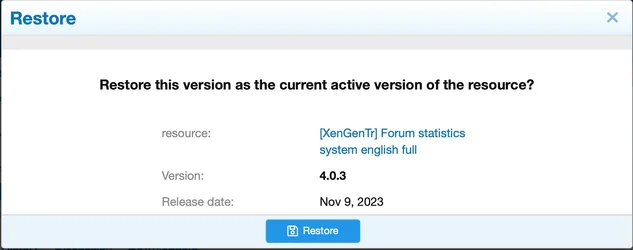
- **Restore version** — Promotes any visible previous version back to the current active version of a resource.
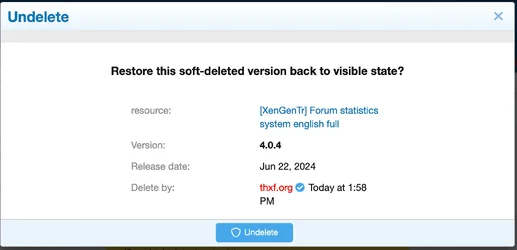
- **Undelete version** — Restores a soft-deleted version back to visible state, with moderator action logging.
- Both actions are surfaced as inline overlay actions on the resource version history page.
- Permission-gated: separate permissions for moderators and for resource owners/team members.
## Permissions
Three permissions are added under the **Resource** permission group:

| Moderator | Can restore any visible previous version as current (applies to all resources) |

| User/Team | Resource owner or team member can restore their own previous versions |
| User/Team | Resource owner or team member can undelete their own soft-deleted versions |
> Moderators with the existing XFRM `deleteAny` permission can also undelete versions on any resource.
## Installation
1. Upload the addon files to `src/addons/KraiCh/KraiRMVersionRestore/`.
2. In the XenForo Admin CP, go to **Add-ons** and install **[KraiCh] XFRM Version Restore**.
3. Assign the desired permissions to the relevant user groups.
## Usage
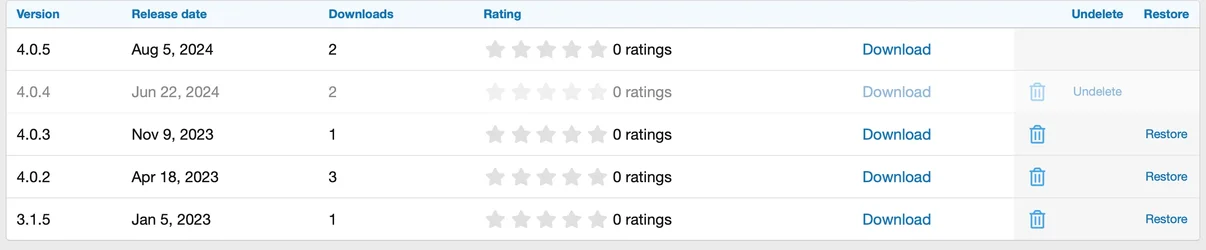
After installation, the **Restore** and **Undelete** action buttons appear as additional columns in the resource version history table (`resources/history`) for users who have the relevant permissions.
- **Restore** — Visible on non-current, visible versions. Opens a confirmation overlay before promoting the version.
- **Undelete** — Visible on soft-deleted versions. Opens a confirmation overlay showing who deleted the version before restoring it.
## Changelog
### 1.0.0
- Initial release.
Allows moderators and resource owners/team members to restore a previous resource version as the current active version, and to undelete soft-deleted versions — directly from the resource version history page.
## Features
- **Restore version** — Promotes any visible previous version back to the current active version of a resource.
- **Undelete version** — Restores a soft-deleted version back to visible state, with moderator action logging.
- Both actions are surfaced as inline overlay actions on the resource version history page.
- Permission-gated: separate permissions for moderators and for resource owners/team members.
## Permissions
Three permissions are added under the **Resource** permission group:
| Moderator | Can restore any visible previous version as current (applies to all resources) |
| User/Team | Resource owner or team member can restore their own previous versions |
| User/Team | Resource owner or team member can undelete their own soft-deleted versions |
> Moderators with the existing XFRM `deleteAny` permission can also undelete versions on any resource.
## Installation
1. Upload the addon files to `src/addons/KraiCh/KraiRMVersionRestore/`.
2. In the XenForo Admin CP, go to **Add-ons** and install **[KraiCh] XFRM Version Restore**.
3. Assign the desired permissions to the relevant user groups.
## Usage
After installation, the **Restore** and **Undelete** action buttons appear as additional columns in the resource version history table (`resources/history`) for users who have the relevant permissions.
- **Restore** — Visible on non-current, visible versions. Opens a confirmation overlay before promoting the version.
- **Undelete** — Visible on soft-deleted versions. Opens a confirmation overlay showing who deleted the version before restoring it.
## Changelog
### 1.0.0
- Initial release.
![[VNXF 2x] Google Translate](/data/resource_icons/0/196.jpg?1773144838)
![[KraiCh] XFRM Extra / [XenGenTr] XFRM Ekstralar sistemi [English]](/data/resource_icons/0/146.jpg?1770205342)
![[KraiCh] Image Watermarker [Free]](/data/resource_icons/0/95.jpg?1770872072)
![[XenCustomize] Forum Views](/data/resource_icons/0/165.jpg?1762672523)
![[BS] Live Forum Statistics](/data/resource_icons/0/156.jpg?1757920098)
![[XenGenTr] XFRM Ekstralar sistemi [English]](/data/resource_icons/0/127.jpg?1743915154)