
![[VNXF 2x] Google Translate](/data/resource_icons/0/196.jpg?1773144838)
- เวอร์ชัน XF ที่เข้ากันได้
- 2.2
- 2.3
VNXF 2x] Google Translate is an addon that makes it easy to integrate a Google Translatebutton into your XenForo forum. Users can select the display language with just one click – extremely convenient and user-friendly.
Code:
For example, you can insert it into PAGE_CONTAINER, footer, or any template you want.
Want to expand your forum's global user base?
Install [VNXF 2x] Google Translate 3.0 and get started today!
Version 3.0 update with more
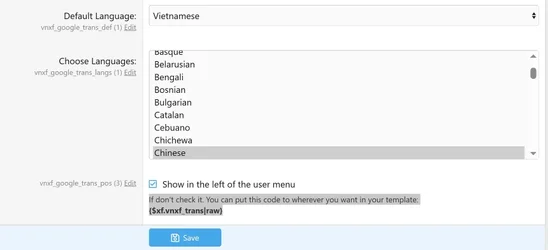
Configuration interface
The interface allows you to:Flexible display position
You have two options: The default display is to the left of the account/login menu (in the header)
→ Simply check "Show in the left of the user menu".- Customize the position manually
→ If you want to insert it in a different specific location, uncheck the box above and paste the following code into your desired template :
Code:
{$xf.vnxf_trans|raw}For example, you can insert it into PAGE_CONTAINER, footer, or any template you want.
Main features:
- Automatically display the Google Translate bar on the forum.
- Options for displaying the language list.
- The configuration interface is simple and intuitive.
- Easily customize the display position.
- No complex code modifications are required.
Quick setup:
- Download the addon from the VNXF forum.
- Extract and upload the files to the folder: src/addons/VNXF/GoogleTrans/.
- Install the addon via AdminCP.
- Access the configuration section → Adjust as desired.
Want to expand your forum's global user base?
Install [VNXF 2x] Google Translate 3.0 and get started today!
![[VNXF] Level System - Leveling and XP Accumulation System](/data/resource_icons/0/195.jpg?1773117588)


![[XenTr] Zenitho](/data/resource_icons/0/152.jpg?1754225293)
![[TH] UI.X 2 Dark](/data/resource_icons/0/90.jpg?1722667565)