

- เวอร์ชัน XF ที่เข้ากันได้
- 2.3
- ข้อกำหนดเพิ่มเติม
- https://www.thxf.org/resources/ap-yazılım-core-library-english.201/
- VirusTotal reports
- https://www.virustotal.com/gui/file/3e8f86a42eee8ab6bc97c883fc6b3e02
Ap-istatistikPro-1.0.0-en.zip
MD5: 3e8f86a42eee8ab6bc97c883fc6b3e02
SHA-256: 34b269764e28b9055cc815598919579259b14104b6a0b0612c4a4903445f92ff
[Ap Yazılım] Statistics Pro
Tabbed forum statistics and user statistics add-on for XenForo
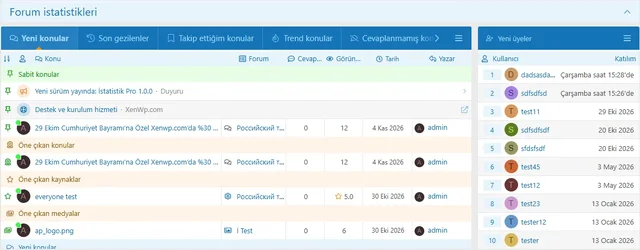
[Ap Yazılım] Statistics Pro is a comprehensive forum statistics add-on that lists your forum's threads, posts, resources and media in tabs, and shows statistics about your members right next to them. From new posts to trending threads, from unread threads to the most reacted posts, it offers 19 different tab types.
Your members can customize their own feed, add the forums they follow most as separate tabs, and change the order of the tabs by dragging. On the administration side, you can control in detail what each tab contains, who can see it, where it is shown and how it looks.
 Key Features
 19 different tab types
Build the statistics you want by choosing from the tab types.
- Threads: New posts, New threads, Trending threads, Featured, Unanswered threads
- Rankings: Most reactions, Most reacted posts, Most replied, Most viewed
- Thread types: Questions awaiting a solution, Solved questions, Polls, Articles
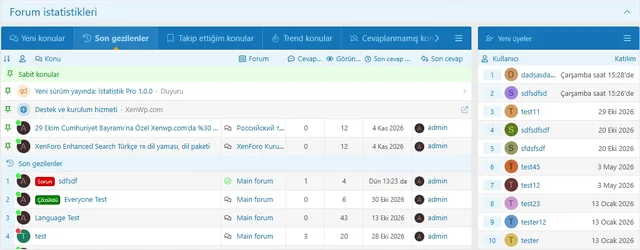
- Member-specific: Recently viewed, Threads I watch, My threads, Unread threads
- Resources and media: New resources, New media
 Detailed settings per tab
- Title and icon: If left empty, the name of the content type is used.
- Visibility: Show the tab only to the user groups you choose, or keep it hidden by default and let members turn it on if they want.
- Forum filter: Limit the tab to the forums you choose. Child forums are included automatically; categories cannot be selected.
- Prefix filter: List only threads with specific thread prefixes in the tab.
- Time range: Limit ranking tabs to the last 24 hours, or 7, 30, 90 or 365 days.
- Trend period: Set a period between 1 and 30 days for trending threads.
- Reaction settings: In the "Most reacted posts" tab, you can set sorting by reaction count or reaction score, the minimum number of reactions, which reaction types are counted, and whether the first posts of threads are included.
 Visual icon picker
While typing tab, user list and sticky link icons, you see a live preview. If you prefer, you can pick an icon with one click from a ready-made icon grid opened with the XenForo menu.
อ่านเว็บบอร์ด
 Drag-and-drop sorting
Arrange tabs and user statistics lists by dragging them in the sort dialog in the admin area. Disabled tabs are not listed in the sort dialog. Authorized members can also create their own order by pressing and holding a tab in the tab bar and dragging it to the right or left.
 Customize feed
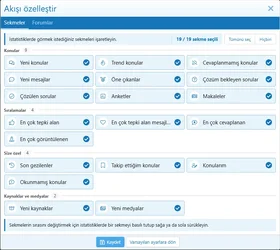
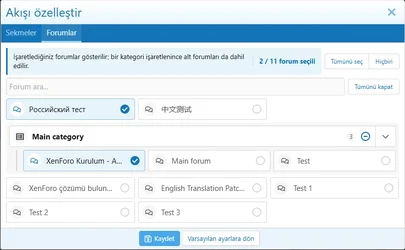
Your members can use the "Customize feed" dialog to choose which tabs they see in the statistics and limit the content to the forums they want. The dialog groups the tabs under the headings Threads, Rankings, Just for you and Resources and media. It includes forum search, select all / none buttons, and a one-click option to restore the default settings.
 Members' forum tabs
Members can add the forums they follow most as separate tabs in the statistics; a member sees at most 10 forum tabs. You manage the icon, sticky thread and featured content settings of these tabs in one shared place. With the position setting, you can always show forum tabs last, or place them among the other tabs according to their display order. In the admin area you can also see which forums were added as tabs and by how many members.
 Sticking threads in statistics
Authorized users can use the "Stick in statistics" link on the thread page to stick threads to the top of the statistics lists.
- Scheduled sticking: If a future start date is chosen, the thread is stuck on that day.
- End date: Expired stickies are removed automatically by an hourly scheduled task.
- Tab-specific sticking: Stick a thread only in the tabs you choose.
- Slider view: Show sticky threads one below another or as a slider, per tab.
 Sticky links
Show your announcements, campaigns or important pages as links above the sticky threads. For each link you can set a title, subtitle, internal or external address, icon and icon color. Links can rotate in order in a single-row slider area, or be shown as fixed rows.
 Featured content sections
Show the threads, resources and media featured in XenForo as slider sections in the tabs you choose. Sections can be browsed with arrows, scroll automatically at the interval you set, and pause while the mouse is over them. Authorized members can turn these sections off for themselves; the preference is stored in their browser.
อ่านเว็บบอร์ด
 User statistics
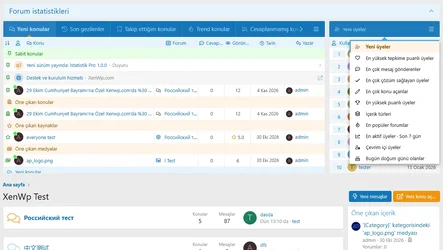
Show a user statistics column next to the statistics, switchable with a dropdown menu. There are 12 list types:
- New members
- Online members
- Most active members (last 24 hours / 7 days / 30 days)
- Members with the highest reaction score
- Top posters
- Members with the most solutions
- Members with the most votes
- Top thread starters
- Members with the most points
- Today's birthdays
- Content types
- Most popular forums
 Privacy-friendly birthday list
The "Today's birthdays" list follows XenForo's privacy rules. Members who hide their birthday and members who haven't visited the site in the last year are not listed. Age is shown only for members who display their birth year. The list is not shown to users who cannot view the member list.
 Resource and media gallery support
The add-on also works together with XenForo's additional products.
- XenForo Resource Manager (XFRM): New resources tab, featured resources section, download count and rating display
- XenForo Media Gallery (XFMG): New media tab, featured media section, comment and view count display
 Auto and manual refresh
Keep tab content up to date without reloading the page. There are four refresh modes:
- Auto and manual: Content refreshes at the set interval, and members can also refresh whenever they want.
- Auto-refresh only: The time remaining until the next refresh is shown in the "Options" menu.
- Manual refresh only: Refreshing happens only when the member asks for it.
- Silent: Content refreshes in the background without showing an icon or the time.
 Load more and infinite scroll
Choose whether new rows are loaded with the "Show more content" button or automatically as you scroll to the end of the list. You can set the number of rows shown per load and the total row limit per tab separately. With the "Rows visible without scrolling" setting, you can fix the height of the lists in rows.
 Flexible positioning
You can show the statistics above the page content, above or below the breadcrumb, or above or below the forum list. With the "Custom position" option, you can add the short code you are given to any template to show the statistics wherever you like. By default the statistics appear on the forum home page; if you wish, you can show them on all pages. They can also be added to the sidebar or any widget position with the "Tabbed thread list" widget.
 Design that fits your theme
Colors are tied to XenForo's style properties and color palette, so they look consistent across different styles and color variations. More than 150 style properties are collected in three organized groups:
- Statistics settings: Columns, sequence number, avatars, online indicator, content type icons, scrollbar, divider lines and tab display (icon only, title only or both)
- Statistics design: Colors and sizes for tabs, rows, headers, sticky and featured sections, menus and the user column
- Statistics icons: Tab, column, section and user list icons
 Mobile and narrow-area support
On mobile, tabs turn into a dropdown menu. On mobile and in narrow areas such as the sidebar, extra columns are hidden while the column headers are kept. Column widths adjust automatically to the width of the statistics area; on wide screens, text is read without being cut off.
 User experience details
- The statistics open and close from the header with the XenForo animation, and the preference is saved.
- The last opened tab is remembered.
- Unread threads are shown in bold.
- Hovering over a thread title opens the XenForo thread preview.
- You can choose whether thread links go to the thread, the first unread post or the last post.
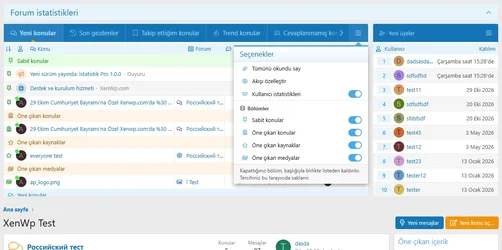
- From the "Options" menu, all forums can be marked as read with XenForo's confirmation dialog.
- A loading indicator is shown in the middle of the area while content loads.
 Permissions by user group
All features are managed with XenForo's permission system. There are 13 separate permissions:
- Viewing statistics and user statistics
- Using auto-refresh
- Hiding sticky threads and the featured thread, resource and media sections
- Sticking threads, and editing and removing stickies
- Customizing the feed, sorting tabs and adding forum tabs
 Performance-focused infrastructure
If the XenForo cache is configured, tab results are cached for a short time by permission group. User statistics are kept in the cache; the "Most active members" list is prepared in the background by a scheduled task. Content is listed with permission checks, only from forums the user can see. The visit records kept for "Recently viewed" are cleaned up automatically by a daily task after the retention period you set.
 How to Use
When the add-on is installed, the six most commonly used tabs (New posts, New threads, Recently viewed, Threads I watch, Trending threads, Unanswered threads) and all user statistics lists come ready to use. Other tab types can be enabled with one click from the admin area.
After you set the user group permissions, the statistics start to appear on the forum home page. Your members can:
- Switch between tabs; if they have permission, press and hold tabs and drag them to create their own order.
- Use the "Options" menu at the right of the tab bar to refresh the content, mark all forums as read, customize their feed and turn sections on and off.
- Choose the tabs and forums they want to see from the "Customize feed" dialog, and add the forums they follow most as separate tabs.
 Settings and Configuration
You can reach all of the add-on's management options from the Statistics Pro section in the XenForo admin area.
- Tabs: Admin → Statistics Pro → Tabs
- Sticky threads: Admin → Statistics Pro → Sticky threads
- Sticky links: Admin → Statistics Pro → Sticky links
- User statistics: Admin → Statistics Pro → User statistics
- General options: Admin → Statistics Pro → General options (or Admin → Setup → Options → [Ap Yazılım] Statistics Pro)
- Appearance: Admin → Statistics Pro → Statistics settings
- Design: Admin → Statistics Pro → Statistics design
- Icons: Admin → Statistics Pro → Statistics icons
- User group permissions: Admin → Groups & permissions → User groups
- Widget: Admin → Appearance → Widgets → "[Ap Yazılım] Statistics Pro: Tabbed thread list"
 Requirements
- XenForo 2.3
- [Ap Yazılım] Core Library 1.1.2 or later
- Optional: XenForo Resource Manager, XenForo Media Gallery
 Why [Ap Yazılım] Statistics Pro?
- Shows the pulse of your forum in a single area with 19 tab types and 12 user statistics lists.
- Lets you shape each tab to exactly what you need with forum, prefix and category filters.
- Lets members organize their own feeds, tab order and forum tabs.
- Highlights important content with scheduled and tab-specific sticking, sticky links and featured content sections.
- Keeps content up to date without reloading the page, with auto-refresh and infinite scroll.
- Works together with XFRM and XFMG to list resources and media in the same area.
- With its design tied to the XenForo color palette, it looks consistent across different styles and works well on mobile and in the sidebar.
- Designed to run lightly even on large forums, with caching and scheduled tasks.
- Works together with XenForo's user permissions and privacy preferences.
- Offers all management options in a single, organized section of the admin area.
[Ap Yazılım] Statistics Pro
ปลั๊กอินสถิติฟอรั่มและสถิติผู้ใช้แบบแท็บสำหรับ XenForo
[Ap Yazılım] Statistics Pro เป็นปลั๊กอินสถิติฟอรั่มที่ครบถ้วน ซึ่งจัดแสดงหัวข้อ โพสต์ ทรัพยากร และสื่อของฟอรั่มของคุณในแท็บต่าง ๆ พร้อมแสดงสถิติเกี่ยวกับสมาชิกของคุณอยู่ข้าง ๆ ทันที ตั้งแต่โพสต์ใหม่ไปจนถึงหัวข้อที่กำลังเป็นที่นิยม ตั้งแต่หัวข้อที่ยังไม่ได้อ่านไปจนถึงโพสต์ที่มีปฏิกิริยามากที่สุด มันเสนอ 19 ประเภทแท็บที่แตกต่างกัน.
สมาชิกสามารถปรับแต่งฟีดของตนเองได้ เพิ่มฟอรั่มที่ติดตามบ่อยที่สุดเป็นแท็บแยกต่างหาก และเปลี่ยนลำดับของแท็บได้ด้วยการลาก ในส่วนการบริหารจัดการ คุณสามารถควบคุมอย่างละเอียดได้ว่าแต่ละแท็บมีเนื้อหาอะไร ผู้ใดสามารถดูได้ แสดงอยู่ที่ใด และแสดงผลอย่างไร
คุณสมบัติหลัก 19 ประเภทแท็บที่แตกต่างกันสร้างสถิติตามที่คุณต้องการโดยเลือกจากประเภทแท็บที่มีอยู่
- หัวข้อสนทนา: โพสต์ใหม่, หัวข้อใหม่, หัวข้อที่กำลังเป็นที่นิยม, หัวข้อที่แนะนำ, หัวข้อที่ยังไม่มีคำตอบ
- อันดับ: จำนวนปฏิกิริยามากที่สุด, โพสต์ที่มีปฏิกิริยามากที่สุด, โพสต์ที่มีผู้ตอบมากที่สุด, โพสต์ที่มีผู้ชมมากที่สุด
- ประเภทหัวข้อ: คำถามที่รอคำตอบ, คำถามที่ได้รับการแก้ไขแล้ว, การลงคะแนน, บทความ
- เฉพาะสมาชิก: ที่ดูล่าสุด, หัวข้อที่ฉันติดตาม, หัวข้อของฉัน, หัวข้อที่ยังไม่ได้อ่าน
- ทรัพยากรและสื่อ: ทรัพยากรใหม่, สื่อใหม่
การตั้งค่าละเอียดสำหรับแต่ละแท็บ- ชื่อและไอคอน: หากไม่กรอก จะใช้ชื่อประเภทเนื้อหา
- การมองเห็น: แสดงแท็บนี้เฉพาะให้กับกลุ่มผู้ใช้ที่คุณเลือก หรือซ่อนไว้ตามค่าเริ่มต้นและให้สมาชิกเปิดใช้งานได้หากต้องการ
- ตัวกรองฟอรัม: จำกัดแท็บให้แสดงเฉพาะฟอรัมที่คุณเลือก ฟอรัมย่อยจะถูกรวมไว้โดยอัตโนมัติ; ไม่สามารถเลือกหมวดหมู่ได้
- ตัวกรองคำนำหน้า: แสดงเฉพาะหัวข้อที่มีคำนำหน้าหัวข้อเฉพาะในแท็บ
- ช่วงเวลารายการ: จำกัดแท็บการจัดอันดับให้แสดงเฉพาะ 24 ชั่วโมงล่าสุด หรือ 7, 30, 90 หรือ 365 วัน
- ช่วงเวลาวิเคราะห์แนวโน้ม: ตั้งช่วงเวลาตั้งแต่ 1 ถึง 30 วัน สำหรับการวิเคราะห์แนวโน้มของหัวข้อสนทนา
- การตั้งค่าปฏิกิริยา: ในแท็บ "โพสต์ที่มีปฏิกิริยามากที่สุด" คุณสามารถกำหนดการจัดเรียงตามจำนวนปฏิกิริยาหรือคะแนนปฏิกิริยา จำนวนปฏิกิริยาขั้นต่ำ ประเภทปฏิกิริยาที่จะนับ และว่าจะรวมโพสต์แรกของหัวข้อหรือไม่
ตัวเลือกไอคอนแบบภาพขณะพิมพ์แท็บ รายชื่อผู้ใช้ และไอคอนลิงก์ที่ติดไว้ คุณจะเห็นตัวอย่างแบบเรียลไทม์ หากต้องการ คุณสามารถเลือกไอคอนด้วยการคลิกเพียงครั้งเดียวจากตารางไอคอนที่เตรียมไว้ ซึ่งเปิดผ่านเมนู XenForo
การจัดเรียงแบบลากและวางจัดเรียงแท็บและรายการสถิติผู้ใช้โดยการลากและวางในหน้าต่างจัดเรียงภายในพื้นที่ผู้ดูแลระบบ แท็บที่ถูกปิดใช้งานจะไม่ปรากฏในหน้าต่างจัดเรียง สมาชิกที่ได้รับอนุญาตยังสามารถจัดเรียงตามลำดับที่ต้องการได้โดยการกดและถือแท็บในแถบแท็บ แล้วลากไปทางขวาหรือซ้าย
ปรับแต่งฟีดสมาชิกสามารถใช้กล่องโต้ตอบ "ปรับแต่งฟีด" เพื่อเลือกแท็บที่ต้องการให้แสดงในสถิติ และจำกัดเนื้อหาให้แสดงเฉพาะฟอรัมที่ต้องการ หน้าต่างนี้จัดกลุ่มแท็บไว้ภายใต้หัวข้อ Threads, Rankings, สำหรับคุณเท่านั้น และ ทรัพยากรและสื่อ ซึ่งรวมถึงการค้นหาในฟอรัม ปุ่มเลือกทั้งหมด/ไม่เลือกอะไรเลย และตัวเลือกคลิกเดียวเพื่อคืนค่าการตั้งค่าเริ่มต้น
แท็บฟอรั่มของสมาชิกสมาชิกสามารถเพิ่มฟอรัมที่พวกเขาติดตามบ่อยที่สุดเป็นแท็บแยกต่างหากในส่วนสถิติ; สมาชิกจะเห็นแท็บฟอรัมได้สูงสุด 10 แท็บ คุณสามารถจัดการการตั้งค่าไอคอน หัวข้อที่ติดไว้ และเนื้อหาที่แนะนำของแท็บเหล่านี้ในที่เดียวที่แชร์กัน ด้วยตัวเลือกตำแหน่ง คุณสามารถตั้งค่าให้แท็บฟอรัมแสดงอยู่ท้ายสุดเสมอ หรือจัดวางแท็บเหล่านี้ระหว่างแท็บอื่น ๆ ตามลำดับการแสดงผลได้ ในพื้นที่ผู้ดูแลระบบ คุณยังสามารถดูได้ว่าฟอรัมใดถูกเพิ่มเป็นแท็บ และโดยสมาชิกกี่คน
การตรึงหัวข้อในสถิติผู้ใช้ที่มีสิทธิ์สามารถใช้ลิงก์ "Stick in statistics" บนหน้าหัวข้อเพื่อตรึงหัวข้อไว้ด้านบนของรายการสถิติ
- การตรึงตามกำหนดเวลา: หากเลือกวันที่เริ่มต้นในอนาคต หัวข้อจะถูกตรึงไว้ในวันนั้น
- วันที่สิ้นสุด: กระทู้ที่ติดไว้ซึ่งหมดอายุจะถูกลบออกโดยอัตโนมัติผ่านงานที่กำหนดเวลาทุกชั่วโมง
- การติดกระทู้เฉพาะแท็บ: ติดกระทู้เฉพาะในแท็บที่คุณเลือกเท่านั้น
- มุมมองสไลเดอร์: แสดงหัวข้อที่ติดไว้แบบเรียงต่อกันหรือเป็นสไลเดอร์ ตามแต่ละแท็บ
ลิงก์ที่ติดไว้แสดงประกาศ แคมเปญ หรือหน้าสำคัญของคุณเป็นลิงก์ด้านบนหัวข้อที่ติดไว้ สำหรับแต่ละลิงก์ คุณสามารถตั้งชื่อหัวข้อ ชื่อรอง ที่อยู่ภายในหรือภายนอก ไอคอน และสีไอคอนได้ ลิงก์สามารถหมุนเวียนตามลำดับในพื้นที่สไลเดอร์แถวเดียว หรือแสดงเป็นแถวคงที่
ส่วนเนื้อหาที่แนะนำแสดงหัวข้อสนทนา ทรัพยากร และสื่อที่ได้รับการแนะนำใน XenForo เป็นส่วนสไลเดอร์ในแท็บที่คุณเลือก ส่วนเหล่านี้สามารถดูได้โดยใช้ปุ่มลูกศร เลื่อนอัตโนมัติตามช่วงเวลาที่คุณตั้งไว้ และหยุดชั่วคราวเมื่อนำเมาส์ไปวางเหนือส่วนนั้น สมาชิกที่ได้รับอนุญาตสามารถปิดส่วนเหล่านี้สำหรับตัวเองได้; การตั้งค่านี้จะถูกเก็บไว้ในเบราว์เซอร์ของพวกเขา
สถิติผู้ใช้แสดงคอลัมน์สถิติผู้ใช้ข้างๆ สถิติ ซึ่งสามารถเปิดหรือปิดได้ผ่านเมนูแบบดรอปดาวน์ มี 12 ประเภทรายการ:
- สมาชิกใหม่
- สมาชิกออนไลน์
- สมาชิกที่ใช้งานมากที่สุด (24 ชั่วโมงที่ผ่านมา / 7 วัน / 30 วัน)
- สมาชิกที่มีคะแนนปฏิกิริยาสูงที่สุด
- ผู้โพสต์มากที่สุด
- สมาชิกที่มีคำตอบมากที่สุด
- สมาชิกที่มีคะแนนโหวตมากที่สุด
- ผู้สร้างหัวข้อหลัก
- สมาชิกที่มีคะแนนสูงที่สุด
- วันเกิดวันนี้
- ประเภทเนื้อหา
- ฟอรั่มยอดนิยม
รายชื่อวันเกิดที่คำนึงถึงความเป็นส่วนตัวรายชื่อ "วันเกิดวันนี้" ปฏิบัติตามกฎความเป็นส่วนตัวของ XenForo สมาชิกที่ซ่อนวันเกิดและสมาชิกที่ไม่ได้เข้าชมเว็บไซต์ในช่วงหนึ่งปีที่ผ่านมาจะไม่ปรากฏในรายชื่อ อายุจะแสดงเฉพาะสำหรับสมาชิกที่เปิดเผยปีเกิดเท่านั้น รายชื่อนี้จะไม่แสดงให้ผู้ใช้ที่ไม่สามารถดูรายชื่อสมาชิกได้
การสนับสนุนแกลเลอรีทรัพยากรและสื่อส่วนเสริมนี้ยังทำงานร่วมกับผลิตภัณฑ์เสริมของ XenForo ได้อีกด้วย
- XenForo Resource Manager (XFRM): แท็บทรัพยากรใหม่ ส่วนทรัพยากรที่แนะนำ การแสดงจำนวนการดาวน์โหลดและคะแนน
- XenForo Media Gallery (XFMG): แท็บสื่อใหม่, ส่วนสื่อที่แนะนำ, การแสดงจำนวนความคิดเห็นและจำนวนการดู
การรีเฟรชอัตโนมัติและด้วยตนเองรักษาเนื้อหาของแท็บให้อัปเดตอยู่เสมอโดยไม่ต้องโหลดหน้าใหม่ มีโหมดการรีเฟรชสี่แบบ:
- อัตโนมัติและแบบมือ: เนื้อหาจะอัปเดตตามช่วงเวลาที่กำหนด และสมาชิกสามารถอัปเดตได้เมื่อใดก็ได้
- อัปเดตอัตโนมัติเท่านั้น: เวลาที่เหลือจนถึงการอัปเดตครั้งต่อไปจะแสดงในเมนู "ตัวเลือก"
- รีเฟรชด้วยมือเท่านั้น: การรีเฟรชจะเกิดขึ้นเฉพาะเมื่อสมาชิกขอเท่านั้น
- แบบเงียบ: เนื้อหาจะรีเฟรชในพื้นหลังโดยไม่แสดงไอคอนหรือเวลา
โหลดเพิ่มเติมและเลื่อนแบบไม่สิ้นสุดเลือกว่าแถวใหม่จะถูกโหลดผ่านปุ่ม "แสดงเนื้อหาเพิ่มเติม" หรือโหลดอัตโนมัติเมื่อคุณเลื่อนถึงท้ายรายการ คุณสามารถตั้งค่าจำนวนแถวที่แสดงต่อการโหลดและขีดจำกัดแถวรวมต่อแท็บได้แยกกัน ด้วยตัวเลือก "จำนวนแถวที่มองเห็นได้โดยไม่ต้องเลื่อน" คุณสามารถกำหนดความสูงของรายการเป็นจำนวนแถวคงที่ได้
การจัดวางที่ยืดหยุ่นคุณสามารถแสดงสถิติได้เหนือเนื้อหาหน้า เหนือหรือใต้ breadcrumb หรือเหนือหรือใต้รายชื่อฟอรัม ด้วยตัวเลือก "ตำแหน่งที่กำหนดเอง" คุณสามารถเพิ่ม shortcode ที่ได้รับไปยังเทมเพลตใดก็ได้ เพื่อแสดงสถิติในตำแหน่งที่คุณต้องการ ตามค่าเริ่มต้น สถิติจะปรากฏบนหน้าหลักของฟอรัม; หากต้องการ คุณสามารถแสดงสถิติบนทุกหน้าได้ นอกจากนี้ ยังสามารถเพิ่มสถิติลงในแถบด้านข้างหรือตำแหน่งวิดเจ็ตใดก็ได้ โดยใช้วิดเจ็ต "Tabbed thread list"
ออกแบบให้เข้ากับธีมของคุณสีถูกผูกกับคุณสมบัติสไตล์และพาเลตสีของ XenForo ดังนั้นจึงดูสอดคล้องกันในสไตล์และตัวเลือกสีต่าง ๆ มีคุณสมบัติสไตล์มากกว่า 150 รายการที่จัดเป็นสามกลุ่มอย่างเป็นระบบ:
- การตั้งค่าสถิติ: คอลัมน์, หมายเลขลำดับ, อวาตาร์, ตัวบ่งชี้ออนไลน์, ไอคอนประเภทเนื้อหา, แถบเลื่อน, เส้นแบ่ง และการแสดงแท็บ (เฉพาะไอคอน, เฉพาะชื่อ หรือทั้งสองอย่าง)
- การออกแบบสถิติ: สีและขนาดของแท็บ แถว หัวแถว ส่วนที่ติดอยู่และส่วนที่แนะนำ เมนู และคอลัมน์ผู้ใช้
- ไอคอนสถิติ: ไอคอนแท็บ คอลัมน์ ส่วน และรายชื่อผู้ใช้
การสนับสนุนบนมือถือและพื้นที่แคบบนมือถือ แท็บจะเปลี่ยนเป็นเมนูแบบดรอปดาวน์ บนมือถือและในพื้นที่แคบ เช่น แถบด้านข้าง คอลัมน์เพิ่มเติมจะถูกซ่อนไว้ แต่หัวคอลัมน์ยังคงแสดงอยู่ ความกว้างของคอลัมน์จะปรับอัตโนมัติให้สอดคล้องกับความกว้างของพื้นที่สถิติ ส่วนบนหน้าจอที่กว้าง ข้อความจะแสดงได้ครบถ้วนโดยไม่ถูกตัด
รายละเอียดประสบการณ์ผู้ใช้- ข้อมูลสถิติจะเปิดและปิดจากส่วนหัวด้วยแอนิเมชัน XenForo และการตั้งค่าจะถูกบันทึกไว้
- ระบบจะจดจำแท็บที่เปิดล่าสุด
- หัวข้อที่ยังไม่ได้อ่านจะแสดงด้วยตัวหนา
- เมื่อนำเมาส์ไปวางเหนือชื่อหัวข้อ จะเปิดหน้าตัวอย่างหัวข้อของ XenForo
- คุณสามารถเลือกว่าลิงก์หัวข้อจะนำไปยังหัวข้อนั้นเอง โพสต์แรกที่ยังไม่ได้อ่าน หรือโพสต์ล่าสุด
- จากเมนู "ตัวเลือก" สามารถทำเครื่องหมายว่าอ่านแล้วสำหรับทุกฟอรั่มได้ผ่านกล่องโต้ตอบยืนยันของ XenForo
- ตัวบ่งชี้การโหลดจะปรากฏอยู่กลางพื้นที่ขณะโหลดเนื้อหา
สิทธิ์ตามกลุ่มผู้ใช้ทุกฟังก์ชันถูกจัดการด้วยระบบสิทธิ์ของ XenForo มี 13 สิทธิ์ที่แยกกัน:
- ดูสถิติและข้อมูลผู้ใช้
- ใช้การรีเฟรชอัตโนมัติ
- ซ่อนหัวข้อที่ติดไว้ (sticky threads) และส่วนหัวข้อที่แนะนำ (featured thread), ส่วนทรัพยากร (resources) และส่วนสื่อ (media)
- การตั้งหัวข้อให้เป็นหัวข้อติดหน้า และการแก้ไขหรือลบหัวข้อติดหน้า
- การปรับแต่งฟีด การจัดเรียงแท็บ และการเพิ่มแท็บฟอรั่ม
โครงสร้างพื้นฐานที่เน้นประสิทธิภาพหากแคช XenForo ได้รับการตั้งค่าไว้ ผลลัพธ์ของแท็บจะถูกเก็บไว้ในแคชเป็นระยะเวลาสั้นๆ ตามกลุ่มสิทธิ์การใช้งาน สถิติผู้ใช้จะถูกเก็บไว้ในแคช ส่วนรายชื่อ "สมาชิกที่ใช้งานมากที่สุด" จะถูกจัดเตรียมในเบื้องหลังโดยงานที่กำหนดเวลาไว้ เนื้อหาจะแสดงพร้อมการตรวจสอบสิทธิ์การใช้งาน โดยแสดงเฉพาะจากฟอรัมที่ผู้ใช้สามารถดูได้เท่านั้น บันทึกการเข้าชมที่เก็บไว้สำหรับ "ดูล่าสุด" จะถูกล้างอัตโนมัติโดยงานประจำวัน หลังจากช่วงเวลาเก็บรักษาที่คุณตั้งไว้
วิธีใช้งานเมื่อติดตั้งส่วนเสริมแล้ว แท็บ 6 แท็บที่ใช้บ่อยที่สุด (โพสต์ใหม่, หัวข้อใหม่, ดูล่าสุด, หัวข้อที่ฉันติดตาม, หัวข้อที่กำลังมาแรง, หัวข้อที่ยังไม่ได้รับคำตอบ) และรายการสถิติผู้ใช้ทั้งหมดจะพร้อมใช้งานทันที ส่วนแท็บประเภทอื่นสามารถเปิดใช้งานได้ด้วยการคลิกเพียงครั้งเดียวจากพื้นที่ผู้ดูแลระบบ
หลังจากที่คุณตั้งค่าสิทธิ์ของกลุ่มผู้ใช้แล้ว สถิติจะเริ่มปรากฏบนหน้าหลักของฟอรั่ม สมาชิกของคุณสามารถ:
- สลับระหว่างแท็บ; หากมีสิทธิ์ ให้กดและถือแท็บไว้แล้วลากเพื่อจัดเรียงตามลำดับที่ต้องการ
- ใช้เมนู "ตัวเลือก" ทางด้านขวาของแถบแท็บเพื่อรีเฟรชเนื้อหา ทำเครื่องหมายว่าอ่านแล้วสำหรับฟอรัมทั้งหมด ปรับแต่งฟีดส่วนตัว และเปิดหรือปิดส่วนต่างๆ
- เลือกแท็บและฟอรัมที่ต้องการดูจากหน้าต่าง "ปรับแต่งฟีด" และเพิ่มฟอรัมที่ติดตามบ่อยที่สุดเป็นแท็บแยกต่างหาก
การตั้งค่าและการกำหนดค่าคุณสามารถเข้าถึงตัวเลือกการจัดการทั้งหมดของส่วนเสริมได้จากส่วน Statistics Pro ในพื้นที่ผู้ดูแลระบบ XenForo
- แท็บ: ผู้ดูแลระบบ → Statistics Pro → แท็บ
- หัวข้อที่ติดไว้: ผู้ดูแล → Statistics Pro → หัวข้อที่ติดไว้
- ลิงก์ที่ติดไว้: ผู้ดูแลระบบ → Statistics Pro → ลิงก์ที่ติดไว้
- สถิติผู้ใช้: ผู้ดูแลระบบ → Statistics Pro → สถิติผู้ใช้
- ตัวเลือกทั่วไป: ผู้ดูแลระบบ → Statistics Pro → ตัวเลือกทั่วไป (หรือ ผู้ดูแลระบบ → การตั้งค่า → ตัวเลือก → [Ap Yazılım] Statistics Pro)
- รูปลักษณ์: Admin → Statistics Pro → การตั้งค่าสถิติ
- การออกแบบ: ผู้ดูแลระบบ → Statistics Pro → การออกแบบสถิติ
- ไอคอน: ผู้ดูแลระบบ → Statistics Pro → ไอคอนสถิติ
- สิทธิ์ของกลุ่มผู้ใช้: ผู้ดูแลระบบ → กลุ่มและสิทธิ์ → กลุ่มผู้ใช้
- วิดเจ็ต: ผู้ดูแลระบบ → รูปลักษณ์ → วิดเจ็ต → "[Ap Yazılım] Statistics Pro: รายการหัวข้อสนทนาแบบแท็บ"
ข้อกำหนด- XenForo 2.3
- [Ap Yazılım] Core Library 1.1.2 หรือเวอร์ชันที่ใหม่กว่า
- ตัวเลือกเสริม: XenForo Resource Manager, XenForo Media Gallery
ทำไมต้องใช้ [Ap Yazılım] Statistics Pro?- แสดงภาพรวมของฟอรัมของคุณในพื้นที่เดียว ด้วย 19 ประเภทแท็บและ 12 รายการสถิติผู้ใช้
- ให้คุณปรับแต่งแต่ละแท็บให้ตรงกับความต้องการของคุณได้อย่างแม่นยำ ด้วยตัวกรองฟอรั่ม คำนำหน้า และหมวดหมู่
- ให้สมาชิกจัดระเบียบฟีดส่วนตัว ลำดับแท็บ และแท็บฟอรั่มของตนเอง
- เน้นเนื้อหาสำคัญด้วยการปักหมุดตามกำหนดเวลาและเฉพาะแท็บ ลิงก์ปักหมุด และส่วนเนื้อหาที่แนะนำ
- รักษาเนื้อหาให้ทันสมัยโดยไม่ต้องโหลดหน้าใหม่ ด้วยฟังก์ชันรีเฟรชอัตโนมัติและเลื่อนแบบไม่สิ้นสุด
- ทำงานร่วมกับ XFRM และ XFMG เพื่อแสดงรายการทรัพยากรและสื่อในพื้นที่เดียวกัน
- ด้วยการออกแบบที่สอดคล้องกับพาเลตสีของ XenForo ทำให้ดูเป็นหนึ่งเดียวในสไตล์ต่าง ๆ และทำงานได้ดีบนมือถือและในแถบด้านข้าง
- ด้วยการออกแบบที่สอดคล้องกับชุดสีของ XenForo ทำให้ดูเป็นหนึ่งเดียวในสไตล์ต่าง ๆ และทำงานได้ดีบนอุปกรณ์มือถือและในแถบด้านข้าง
- ออกแบบมาเพื่อทำงานได้อย่างเบาแม้ในฟอรั่มขนาดใหญ่ ด้วยระบบแคชและงานตามกำหนดเวลา
- ทำงานร่วมกับสิทธิ์ผู้ใช้และตั้งค่าความเป็นส่วนตัวของ XenForo
- นำเสนอตัวเลือกการจัดการทั้งหมดในส่วนเดียวที่จัดระเบียบอย่างดีภายในพื้นที่ผู้ดูแลระบบ

addon 2.3
[XenDev] Viewing Statistics [English]


