
![[VNXF 2x] Google Translate](/data/resource_icons/0/196.jpg?1773144838)
- เวอร์ชัน XF ที่เข้ากันได้
- 2.2
- 2.3
- VirusTotal reports
- https://www.virustotal.com/gui/file/5cd3c07eebc04eb8e37e59ec3aec9c06
VNXF 2x] Google Translate is an addon that makes it easy to integrate a Google Translatebutton into your XenForo forum. Users can select the display language with just one click – extremely convenient and user-friendly.
Code:
For example, you can insert it into PAGE_CONTAINER, footer, or any template you want.
Want to expand your forum's global user base?
Install [VNXF 2x] Google Translate 3.0 and get started today!
Version 3.0 update with more
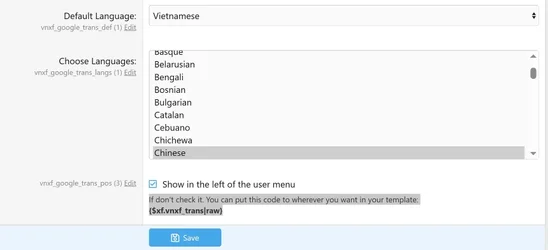
Configuration interface
The interface allows you to:Flexible display position
You have two options: The default display is to the left of the account/login menu (in the header)
→ Simply check "Show in the left of the user menu".- Customize the position manually
→ If you want to insert it in a different specific location, uncheck the box above and paste the following code into your desired template :
Code:
{$xf.vnxf_trans|raw}For example, you can insert it into PAGE_CONTAINER, footer, or any template you want.
Main features:
- Automatically display the Google Translate bar on the forum.
- Options for displaying the language list.
- The configuration interface is simple and intuitive.
- Easily customize the display position.
- No complex code modifications are required.
Quick setup:
- Download the addon from the VNXF forum.
- Extract and upload the files to the folder: src/addons/VNXF/GoogleTrans/.
- Install the addon via AdminCP.
- Access the configuration section → Adjust as desired.
Want to expand your forum's global user base?
Install [VNXF 2x] Google Translate 3.0 and get started today!
![[VNXF] Level System - Leveling and XP Accumulation System](/data/resource_icons/0/195.jpg?1773117588)
![[KraiCh] XFRM Version Restore](/data/resource_icons/0/199.jpg?1775911389)
![[Eggy] Virelume](/data/resource_icons/0/220.jpg?1792735830)
![[TH] Featured Threads and Content](/data/resource_icons/0/219.jpg?1789537744)
![[XenGenTr] Önek Tasarımları | Prefix Designs [English]](/data/resource_icons/0/148.jpg?1749883440)
![[XenGenTr] Resimli konu vitrini | Illustrated subject showcase [English]](/data/resource_icons/0/149.jpg?1749969380)
![[XenGenTr] Kullanıcı afiş tasarımları | User banner designs [English]](/data/resource_icons/0/147.jpg?1749730604)