
![[XenGenTr] Forum statistics 📊 system V4 full [English]](/data/resource_icons/0/100.jpg?1726469921)
- เวอร์ชัน XF ที่เข้ากันได้
- 2.3
- ข้อกำหนดเพิ่มเติม
- xf 2.x https://www.thxf.org/threads/xengentr-forum-statistics-system-english-full-by-thxf-org.47241/
- การสร้างแบรนด์ที่มองเห็นได้
- ไม่
[XenGenTr] Forum statistics system V4
Our plugin that you will use to list your forum topic content according to certain criteria. The simplest and most advanced plugin for forum statistics, most hits from the forum, latest topics and source list for Xenforo 2.
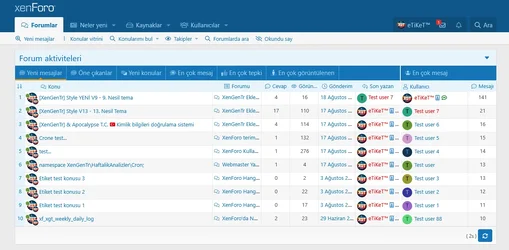
 List the topics with the last posts in the forum with the new messages tab.
With this tab, you can list the topics with the last message written in those forum(s) by drawing data in the forum you want.- With this tab, you can focus on a forum(s) by pulling data in any forum you want. For example: VIP Recently written messages, you can get a remarkable tab by editing the tab name accordingly.
- You can add these tabs as many as you want and use them with different titles.
 With the new topics tab, you can list the latest topics opened in the forum
With this tab, you can list the topics that have been opened in those forum(s) by drawing data in the forum you want.- With this tab, you can also provide various focuses. For example: Recent commercial topics, you can get a remarkable tab by editing the tab name accordingly.
- You can add these tabs as many as you want and use them with different titles.
 In the topics tab that receives the most messages, you can list the topics that receive the most messages in the forum;
With this tab, you can list the topics that receive the most messages in those forum(s) by drawing data in the forum you want.- With this tab, you can also provide various focuses. For example: Commercial topics that receive the most messages, you can get a remarkable tab by editing the tab name accordingly.
- You can add these tabs as many as you want and use them with different titles.
 You can list the topics that received the most reactions in the forum;
With this tab, you can list the topics that get the most likes in those forum(s) by pulling data in the forum you want.- With this tab, you can also provide various focuses. For example: Our most liked topics, you can get a remarkable tab by editing the tab name accordingly.
- You can add these tabs as many as you want and use them with different titles.
 In the most viewed topics tab, you can list the most viewed topics in the forum;
With this tab, you can list the topics in the most viewed field in those forum(s) by drawing data in the forum you want.- With this tab, you can also provide various focuses. For example: The most shown commercial topics, you can get a remarkable tab by editing the tab name accordingly.
- You can add these tabs as many as you want and use them with different titles.
🗒 Instantly follow all the resources added to the forum with the Resources tab;
With this tab, you can facilitate the tracking of resources by drawing data from the source category(s) you want.- You can add these tabs as many as you want and use them with different titles.
 Most liked users area.
This area is only an area where the most liked users are listed.Authorization;
- Show/hide statistics in desired user groupsOptions;
- Various topics or options to use in our own location.- Content display limit.
-
- Auto renewal on/off in visitors.
Theme features;
With this field, you can now configure your statistics according to your theme as you wish.- Tab tab icons enabled - open/close
-
- Data list - User online status enabled - on/off
- Data list - Avatar of the user who wrote the last message is active - open/close
- Data list - Content detail icons enabled (sor, article, source) - on/off
- Data list - Time enabled - on/off
- Data list - Content forum enabled - open/close
- Data list - Message count enabled - on/off
- Data list - Last message writer active - open/close
- Collapse system enabled - open/close
Scrollbar customization;
- Completely confidential- Hide it, show it when it comes on
- Show anytime
User statistics;
-User statistics enabled - on/off-User statistics field location
-- Position on the left block
-- Position on the right block
And you can control and color control many areas like these.
![[XenGenTr] Prefix system](/data/resource_icons/0/98.jpg?1723963896)
![[ITM] Chevereto Integration](/data/resource_icons/0/107.jpg?1731068111)
![[TH] Featured Threads and Content](/data/resource_icons/0/219.jpg?1789537744)
![[XenGenTr] Önek Tasarımları | Prefix Designs [English]](/data/resource_icons/0/148.jpg?1749883440)
![[XenGenTr] Resimli konu vitrini | Illustrated subject showcase [English]](/data/resource_icons/0/149.jpg?1749969380)
![[XenGenTr] Kullanıcı afiş tasarımları | User banner designs [English]](/data/resource_icons/0/147.jpg?1749730604)
![[XenGenTr] İçerik Akışı | Content Feed [English]](/data/resource_icons/0/203.jpg?1777116149)