
ติดตั้งแอป
วิธีติดตั้งแอปบน iOS
ติดตามวิดีโอด้านล่างเพื่อดูวิธีการติดตั้งเว็บไซต์ของเราเป็นแอปเว็บบนหน้าจอหลักของคุณ
บันทึก: ฟีเจอร์นี้อาจไม่สามารถใช้งานได้ในบางเบราว์เซอร์
คุณกำลังใช้เบราว์เซอร์ที่ล้าสมัย อาจไม่แสดงเว็บไซต์นี้หรือเว็บไซต์อื่นๆ ได้อย่างถูกต้อง
คุณควรอัปเกรดหรือใช้ เบราว์เซอร์ทางเลือก
คุณควรอัปเกรดหรือใช้ เบราว์เซอร์ทางเลือก

addon 2.x Advanced Traffic Statistics: Live Radar, WAF & AI Security 1.9.12
- ผู้เขียน thxf.org
- วันที่สร้าง
A smaller release than the last one, focused on the panel you keep open the longest. The Live Radar has been rebuilt from the ground up, it can now refresh itself, and two tracking bugs that were quietly distorting your own numbers have been fixed.
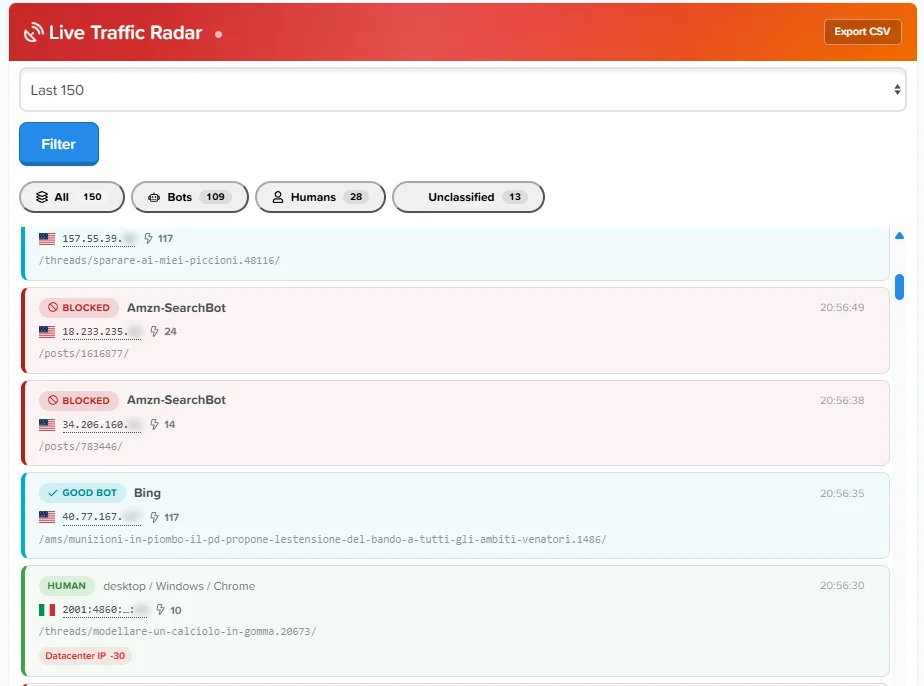
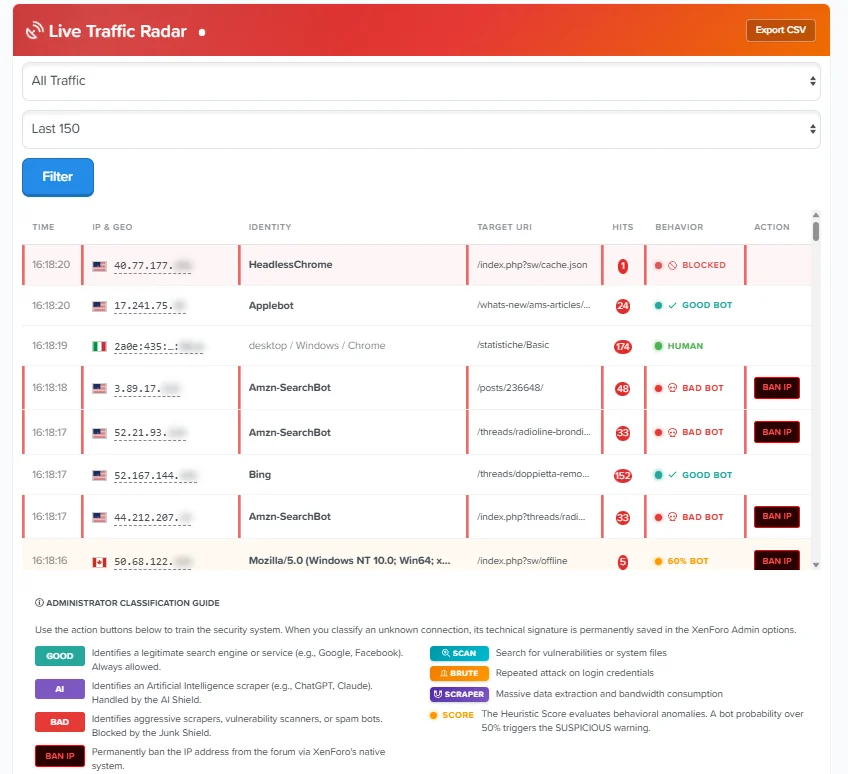
The table is gone. Each access is now a card with a coloured edge that tells you its classification at a glance — dark red for blocked, orange for suspicious, teal for verified crawlers, green for humans — with a matching background tint. On a long list you read the composition of your traffic by scrolling, without stopping to decode badges.
The Live Radar, rebuilt
The horizontal scrollbar is gone for good. It came from the fixed-width action column, which no longer exists: the ban and trust buttons now sit outside the flow, hidden at rest and revealed when you hover a row. On touch devices and narrow screens they are always visible, below the row content. Nothing is cut off, nothing needs dragging sideways.
The timestamp moved under the address to free horizontal space, and hovering it shows the full date — useful on quieter boards where consecutive rows can be from different days.
Rows arrive with a short staggered animation and the most recent one carries a pulsing dot. All of it honours the operating system's "reduce motion" preference.
The radar can now reload its rows on a timer without refreshing the page. New rows slide in at the top with a green highlight that fades after a couple of seconds, and the tab counters recalculate themselves while keeping whatever filter you had selected.
Auto-refresh
It is off by default and costs nothing until you enable it. When it is on, the refresh is skipped while the browser tab is in the background and while your pointer is over the list — so it never shifts a row from under your cursor while you are aiming at a button. Each cycle is a single cached query.
The markup comes from the server rather than being rebuilt in JavaScript, so there is one source of truth for a row and future changes apply to live updates automatically.
The unclassified traffic clusters panel raised a fair question: if a group is 100% datacenter, hasn't the add-on already classified it? It had — and it was appearing in the Datacenter panel at the same time, which looked like a contradiction.
Clusters now show how they were already classified
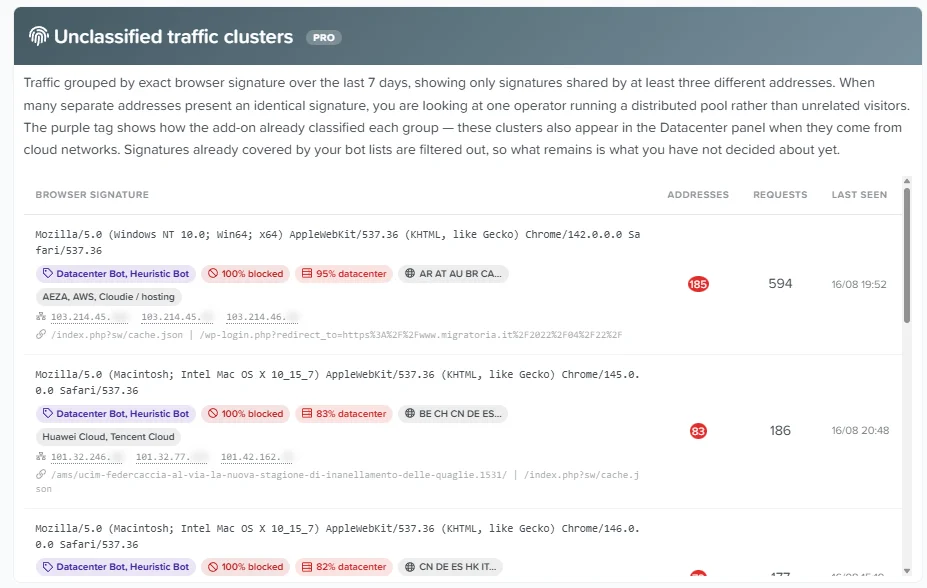
Each cluster now carries a purple tag with the classification the add-on assigned it, plus the share of its addresses currently blocked. The overlap between the two panels becomes explicit instead of suspicious: you can see at a glance that a cluster is already handled, and concentrate on the ones that are not.
The radar's action buttons stopped working after the layout change in the previous version, because the JavaScript was still looking for the old table structure. Ban, trust and classification are functional again.
Two fixes to how the add-on measures itself
The add-on was counting its own requests. The auto-refresh polling and the ban, trust and classify buttons are AJAX calls that were being recorded as page views, inflating hit counts on the admin's own address and filling the radar with entries pointing at the add-on's internal endpoints. Every internal endpoint is now excluded from measurement, while an ordinary discussion whose title happens to contain one of those words is still counted normally.
One new option, in Admin CP → Options → Advanced Traffic Statistics:
Option to review after upgrading
Live Radar auto-refresh (seconds) — 0 by default, which disables it entirely. Set it to 15 or 30 if you want the radar to update itself while you watch. Values between 1 and 9 are treated as 10 seconds.
Nothing else needs changing.
The Live Radar is a Pro feature governed by its own permission, so the redesign and the auto-refresh apply wherever the radar is already available to you. The cluster classification tags are part of the Pro clusters panel.
Free and Pro
The measurement fixes apply to every installation regardless of licence: they concern how the add-on counts, not what it blocks.
No database changes in this release. The package adds one new template used internally by the radar; nothing needs to be created by hand.
Upgrade notes
If you were already running the previous version, the radar action buttons were not working — this release restores them, and it is worth updating for that alone.
This release started as an interface clean-up and turned into something more interesting: while testing it on a live board, the add-on caught itself counting things that were never visitors at all. Fixing that changed what the numbers mean — for the better, and you should read the upgrade note before you update.
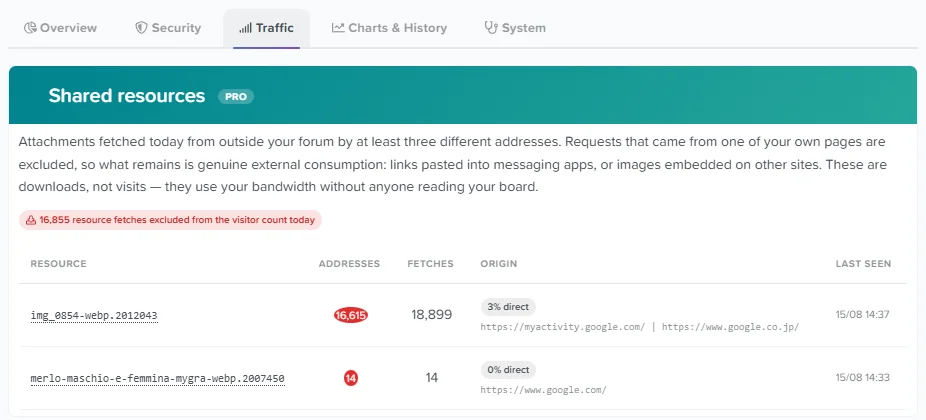
Until now, every request was counted, including images fetched directly from outside your forum. If one of your attachments ranks on Google Images, thousands of people can download it without ever opening your board — and they were all counted as visitors.
Read this first: your visitor count will go down
On the test board this was not a small effect. A seasonal image was pulling 16,500 addresses a day straight from Google Images, while the thread containing it had 431 views. Three quarters of the reported "visitors" had never seen a single page.
From this version, a visitor is someone who loaded at least one real page. Resource downloads are counted separately and shown in their own panel. Your daily figures will drop, sometimes sharply, and the trend badges will show large negative swings for a few days until periods become comparable again. This is not a regression — it is the number you should have been seeing all along.
Historical data is left untouched. The archive realigns day by day as the maintenance cron writes new entries, and is fully consistent after a month.
Your board is probed daily for /wp-login.php, /wp-content/plugins/... and similar paths. On a domain without WordPress, those requests have no legitimate explanation — unlike a heuristic trust score, this is a certainty, so it can justify blocking outright with practically no false-positive risk.
WordPress Trap
Enable the new option only if WordPress is not installed on your domain, and the add-on will reject those requests with a 403 and ban the address temporarily, so repeat attempts are cut at the earliest possible point.
Media paths (/wp-content/uploads/) are deliberately excluded: if your domain previously ran WordPress, old image links may still be followed by Facebook, Google and real visitors. Verified legitimate crawlers are never trapped either.
Some scrapers announce themselves as two browsers at once — a user-agent declaring both Firefox and Chrome, or a Gecko build number alongside AppleWebKit. No real browser can do this. These signatures now take a heavy trust penalty, which pushes them below the bot threshold and hands them to the Junk Shield. As with every other penalty, the reason is shown in the radar so you can see exactly why.
Contradictory browser signatures
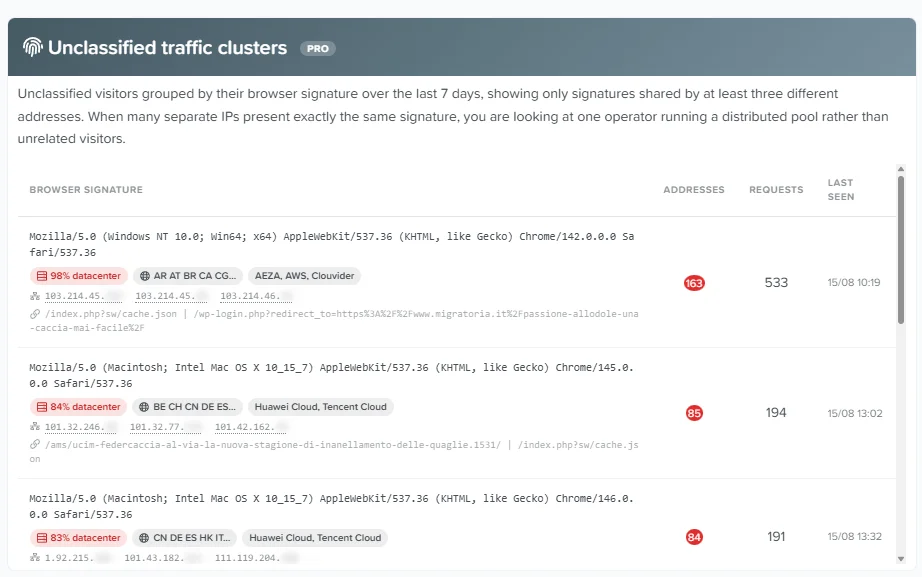
Bots that don't match any of your lists are now grouped by their exact browser signature over the last 7 days. When hundreds of separate addresses present an identical string, that is one operator running a distributed pool, not unrelated visitors.
Each cluster carries the evidence you need to judge it: the share of addresses on datacenter networks, the countries involved, the hosting providers, sample addresses with AbuseIPDB lookups, and sample requested paths. Signatures already covered by your bot lists are filtered out automatically, so the panel only shows what you have not classified yet.
A new panel lists attachments downloaded from outside your forum — links pasted into messaging apps, images embedded on other sites, or search-engine image results. Requests coming from your own pages are excluded, so what remains is genuine external bandwidth consumption. This is where the Google Images traffic described above becomes visible instead of silently inflating your statistics.
Shared resources
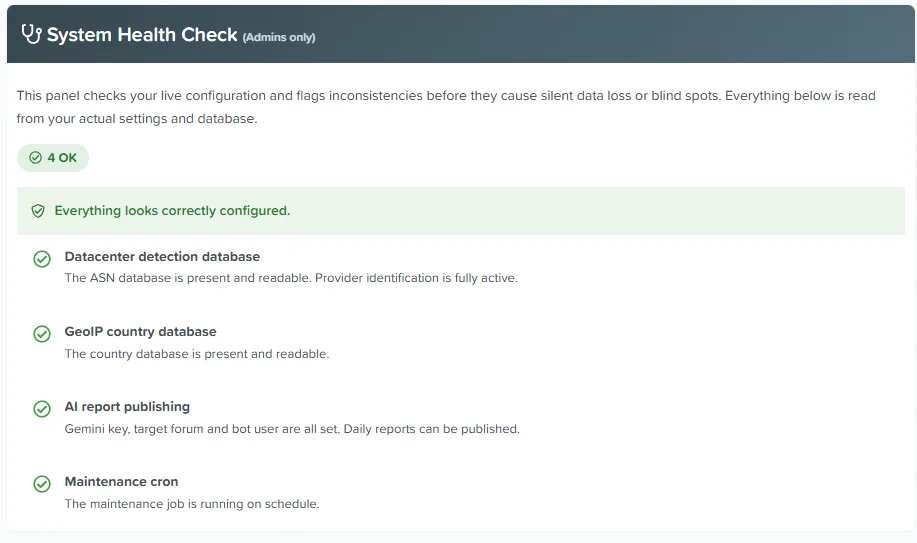
The configuration health check has moved to a dedicated tab, where it will grow into a proper diagnostics area. It verifies nine dependencies against your live setup — missing databases, shields that cannot act, permissions that expose too much, a stalled cron — and every warning tells you what to do about it.
New System tab
The radar now splits into tabs — All, Bots, Humans, Unclassified — switching instantly with no page reload. The horizontal scrollbar is gone: the timestamp moved under the address, redundant columns hide themselves per tab, and on narrow screens the table becomes stacked cards. The Unclassified tab is the interesting one: visitors who lost trust points without falling far enough to be reclassified as bots.
- The datacenter panel no longer disappears when ASN detection is switched off; historical data stays visible with a clear notice.
- "Flagged today" was permanently stuck at zero on boards with datacenter hard-block active, because blocked visitors were excluded from the count.
- Charts no longer overflow their container when a tab is opened without reloading the page.
- The blocked-threat figure in the sidebar widget and on the statistics page now come from the same source and always agree.
- Attachment requests no longer overwrite the last page visited, so the radar shows what people are actually reading.
Two new options, both under Admin CP → Options → Advanced Traffic Statistics:
WordPress Trap — off by default. Turn it on only if WordPress is not installed anywhere on your domain, including a blog in a subfolder. Detection is recorded for everyone; blocking requires a Pro licence.
WordPress Trap ban duration — 60 minutes by default. How long a trapped address stays banned.
Nothing else needs changing. Existing settings are preserved.
Both: the corrected visitor count, the shared-resources exclusion, the System tab and configuration health check, the redesigned radar layout, all detection improvements, and the Shield Impact counters.
Free: detection runs exactly as it does for Pro — the difference is what happens next. The Shield Impact panel and the sidebar widget now show what would have been blocked instead of a permanent zero, so you can see the volume you are letting through. Addresses, targeted paths, provider rankings, cluster details and the shared-resources table remain licence-gated and are never sent to the browser without one.
Pro: shields act on what they detect, the WordPress Trap blocks and bans, and the unclassified clusters and shared resources panels are fully visible with sample addresses and reputation lookups.
The upgrade adds two columns and one table, all created automatically. Existing data is preserved, and existing rows are marked as page views so you do not start with an empty history. Upgrading directly from 1.9.8 or 1.9.9 runs every intermediate step in order.
Several new phrases ship with this release for the new panels and the radar reason codes; translators will find them in the usual place.
As always, if you spot a detection this add-on gets wrong, post a screenshot in the discussion thread. The Google Images finding described above came from exactly that kind of second look at a number that seemed too good to be true.
Until now the add-on told you what it decided. This release tells you why.
Every visitor gets a trust score, but a number on its own explains nothing. An admin looking at "40% trust" had no way to know whether that came from a forged browser signature, a datacenter IP, or an abnormal request rate. Version 1.9.9 opens that black box — and adds two panels that answer the two questions I get asked most often: is my configuration actually correct? and what am I missing by leaving the shields off?
Score reason codes in the Live Radar
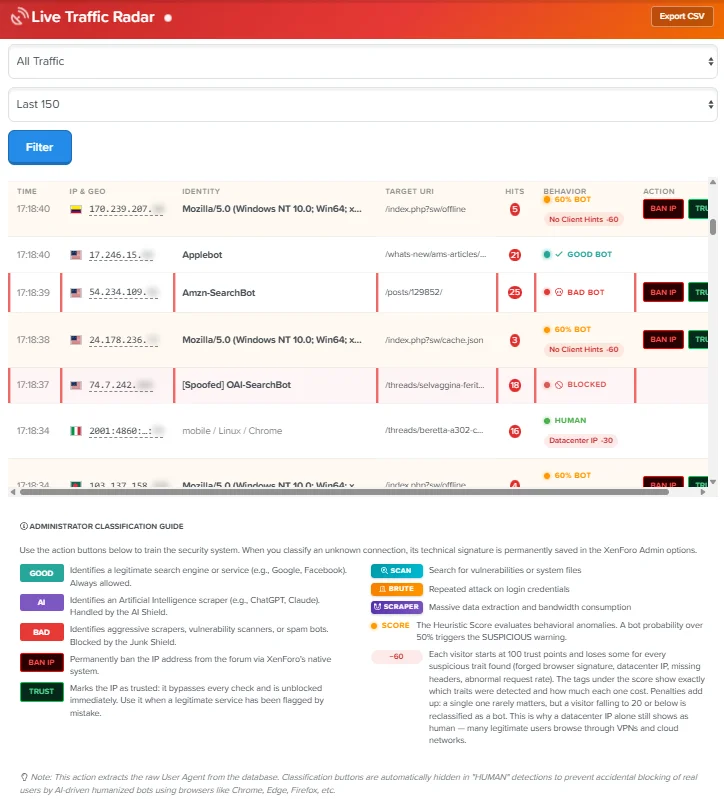
Each visitor in the radar now shows the individual penalties that produced its trust score, with the exact weight of each one:
- Missing user-agent — 90 points
- Suspicious URL (.env, wp-login, .git, .aws) — 80 points
- Incomplete browser signature — 60 points
- Outdated browser version — 50 points
- Abnormal request rate — 50 points
- No Accept-Language header — 40 points
- Datacenter IP — 30 points (configurable)
Visitors start at 100 points. Penalties accumulate, and only a visitor falling to 20 or below is reclassified as a bot. This is deliberate: a single signal is rarely enough. It also explains something that surprises people at first — a datacenter IP on its own still shows as human, because plenty of legitimate users browse through VPNs, corporate proxies and cloud networks. The score becomes an audit trail you can actually argue with.
Shield Impact — what you would have blocked
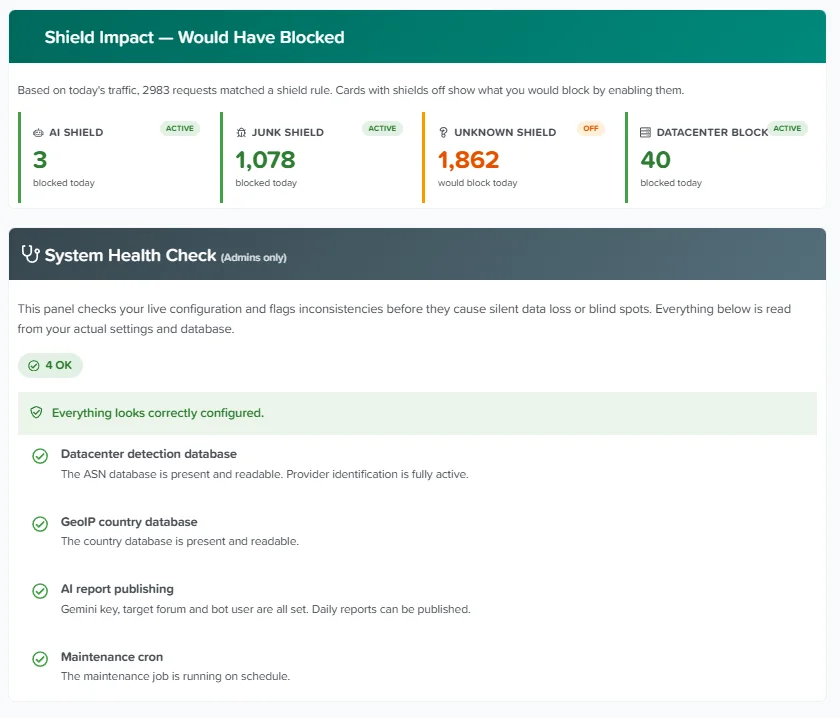
The datacenter panel already separated "flagged" from "blocked", which is effectively an observation mode. That idea now covers every shield.
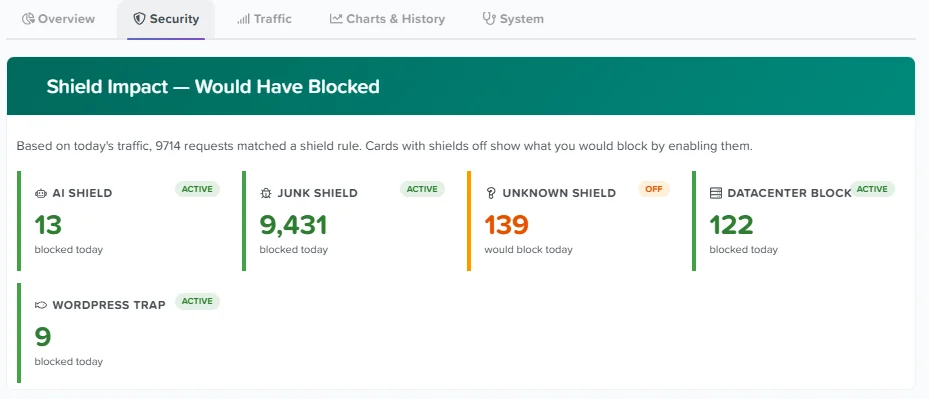
A new panel shows, for AI Shield, Junk Shield, Unknown Bots and Datacenter, how much traffic matched each rule today. If a shield is active, the number is what it blocked. If it is off — or if you are running without a Pro license — the number is what it would have blocked. On a mid-sized forum this is usually the moment the abstract becomes concrete: a few hundred requests a day you were not aware of.
System Health Check
With 47 options and dependencies that are not always obvious, a misconfiguration can stay silent for weeks. This admin-only panel checks nine things against your live configuration and database:
- Datacenter detection enabled but the ASN database missing (running in reduced mode)
- GeoIP enabled but the country database missing or unreadable
- Gemini API key set but no target forum or bot user, so reports are generated and never published
- Maintenance cron not running, which is the usual cause of statistics that appear frozen
- Cloudflare headers detected but real IP recovery disabled, so every visitor is recorded with the proxy IP
- Shields switched on without a valid Pro license, so nothing is actually blocked
- Live Radar permission granted to non-staff groups, exposing visitor IP addresses
- Invalid entries in the IP whitelist, silently ignored
- Access log volume unusually high against the configured retention
Each check reports one of three states, and every warning comes with a line telling you what to do about it — not just what is wrong.
Fixes
- The datacenter panel no longer disappears when ASN detection is disabled. Historical data stays visible, with a clear notice that collection is paused.
- "Flagged today" was permanently stuck at zero on forums with datacenter hard-block active, because blocked visitors were excluded from the count. It now reports all detected datacenter traffic, with "Blocked today" as the subset actually stopped.
- "Flagged" and "Blocked" now use the same unit, so the two figures are comparable.
Upgrade notes
The upgrade adds one column and one table, both created automatically. Existing data is preserved. A handful of new phrases are included for the health check, the shield impact panel and the radar reason codes — translators will find them in the usual place.
As always, if you spot a detection this add-on gets wrong, post a screenshot in this thread. Several features exist because someone did exactly that.
The daily security report has always told you what happened on your board. From this release it tells you what it means — and, just as importantly, when you can safely ignore it.
Intrusion intelligence in the daily report
The AI report now receives the full intrusion picture: attempts grouped by category, the paths that were targeted, and how many distinct sources were involved — alongside the datacenter figures added previously.
More significantly, it now knows how to read them. The report distinguishes three intentions that look identical in a log but mean completely different things:
- Generic CMS sweeps — scanners firing the same list of paths at millions of addresses without checking what any of them run. On a board that doesn't run that software they are harmless background noise, and the report says so plainly instead of raising an alarm.
- Backdoor hunting — requests for /shell.php, /alfa.php, filemanager scripts or plugin names that don't exist officially. These attackers aren't trying to break in: they're looking for a site someone else already compromised, hoping to reuse the access. That tells you the activity is opportunistic rather than aimed at you.
- Configuration exposure — /.env, /.git/, config files, backup archives. These seek credentials and API keys accidentally left readable, and are the one category where a single success is serious.
Anything XenForo-specific — probes against /install/, /src/config.php, or admin.php with unusual parameters — is flagged separately, because a targeted probe matters far more than the raw volume of generic scanning.
Each report closes with a verdict in plain language: ordinary background noise, an increase worth watching, or something that needs action.
This one matters for accuracy. Many forums run a WordPress blog or phpMyAdmin on the same domain. For those boards, /wp-login.php probes are not harmless noise — they are attempts against a real installation, and a report that reassures you while you're genuinely under attack is worse than no report at all.
You can now declare what else runs on your domain. Leave the field empty and other-CMS probes are correctly treated as indiscriminate scanning; fill it in and the same probes are reported as genuine attempts against a real target.
Report language, handled automatically
Previously the AI inferred which language to write in from the language of the prompt, which could produce mixed-language reports on translated boards. The report language is now explicit and detected from your board's default language automatically — nothing to configure. A setting is available if you want the report in a different language from the forum.
Your own instructions
A new field lets you append your own guidance to the report prompt: keep the traffic summary short and focus on security, describe the nature of your community, set the tone. These are added to the built-in analysis rather than replacing it, so future improvements to the underlying reasoning still reach you.
The "generate traffic analysis" button gets the same treatment:
- Intrusion attempts, targeted paths and datacenter providers are now included in the generated prompt.
- Internal application traffic — service worker requests, AJAX tokens, stylesheets — is filtered out of the most-requested-pages list, which previously filled the top positions with data that said nothing about security. The list now shows eight genuinely informative paths instead of five noisy ones.
- The same language and installed-software awareness applies.
Fixes
- Datacenter provider figures were inconsistent — the totals counted only flagged datacenter traffic while the provider ranking counted every address with a known provider, including exempted search-engine crawlers. Google could appear in a list of hosting providers sending suspicious traffic. Both now use the same criteria.
- The report prompt contained literal escape sequences instead of line breaks.
- Upload and run the upgrade from the Add-ons page as usual. No database changes.
- If you run any other web application on the same domain — a WordPress blog, phpMyAdmin, anything — declare it in the new setting. It directly affects whether the report treats probes against it as noise or as a real attack.
- The report language needs no configuration unless you want it different from your board's language.
- The daily report runs on its usual schedule; you can trigger it manually from Tools → Cron entries to see the new analysis immediately.
Advanced Traffic Statistics 1.9.7 — Accurate trends, one-click whitelist & a dashboard that breathes
This release fixes the trend indicators so they finally tell the truth, adds a one-click way to rescue false positives, and gives the dashboard a live pulse that reflects what is actually happening on your board.
Trend indicators corrected
The percentage badges introduced in 1.9.5 were comparing incomplete periods against complete ones: at 2am your "visitors today" was being measured against a full day of yesterday, and on the 1st of the month a few hours were measured against an entire previous month. The result was alarming drops that meant nothing.
Comparisons are now made against the same fraction of the period elapsed. At 2am with 900 visitors against yesterday's 12,000 you now read −10% instead of −92%; on the 1st of the month you read a sensible figure instead of −95%.
Two safeguards were added: the badge is hidden entirely when the comparison period is too small to be meaningful (new or quiet boards no longer see wild percentages), and the monthly badge stays hidden for the first two days of each month, when a handful of hours cannot yet say anything reliable about a full month.
One-click whitelist from the radar
Every entry in the Live Traffic Radar now has a TRUST button next to BAN IP. One click adds that address to the whitelist, clears it from the block cache so access is restored immediately rather than after the cache expires, and removes the blocked flag from its records.
This is the antidote to false positives: when a legitimate service — a monitoring bot, a link preview, a partner's server — gets caught by the shields, you fix it in two seconds instead of editing the whitelist option by hand.
A dashboard that shows a pulse
The Overview now has a server heartbeat: an ECG trace running between the counters and the rest of the page. It is not decoration — it reads live data.
- Colour reflects your traffic mix — green while bots stay under 40% of visitors, amber up to 65%, red beyond that.
- Speed reflects volume — the trace runs slowly on a quiet board and noticeably faster on a busy one.
- The creatures are real — small figures walk along the line, and their type and number are drawn from your actual traffic: teal robots for legitimate crawlers, amber bugs for detected datacenter traffic, red spiders for intrusion attempts. If nothing hostile is happening, you only see robots.
- Threats are destroyed on arrival — hostile creatures reaching the shield at the end of the line flash and disintegrate. Crawlers pass through untouched.
The same trace appears in the sidebar widget in a compact form, so every visitor sees your board is actively monitored — with a discreet pause control for anyone who prefers a static sidebar, remembered across pages.
The KPI counters also count up to their value on load, matching the widget.
All of this is pure CSS and lightweight vanilla JavaScript with no additional database queries — the widget in particular runs on every page view, so the heartbeat is computed from figures it already had. Every animation honours the operating system's "reduce motion" accessibility setting.
Charts & History improvements
- Explanatory legends added to all four sections, clarifying what each figure actually measures — for example that the 30-day chart counts unique visitors rather than page views, and that the country ranking excludes bot traffic.
- Trend table redesigned — the daily list beside the 30-day chart is now compact, aligned to the chart height (no more empty space below it), and each day carries a proportional bar so you can read the trend by scanning the list.
- A section title in the Overview contained untranslatable hardcoded text.
- The GeoIP heading was showing a duplicated word.
- Upload and run the upgrade from the Add-ons page as usual. No database changes.
- The heartbeat and animated counters are enabled automatically; no configuration required.
- Visitors who prefer no movement can pause the sidebar animation with the small control at the end of the line, and their choice is remembered.
Enjoy!
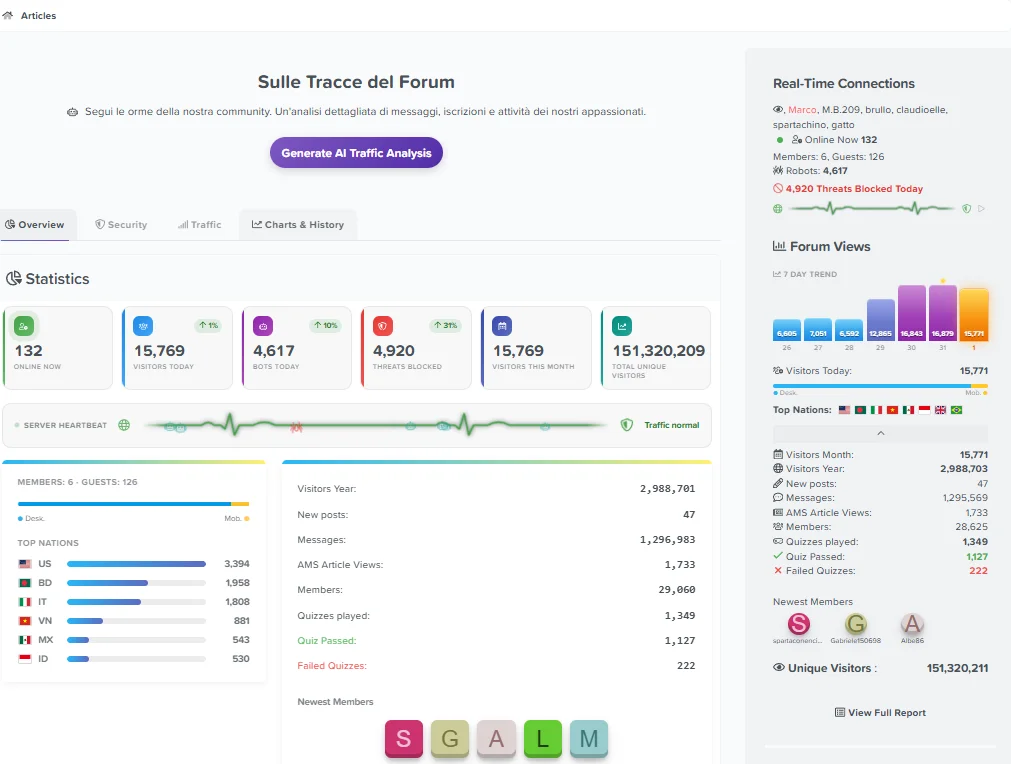
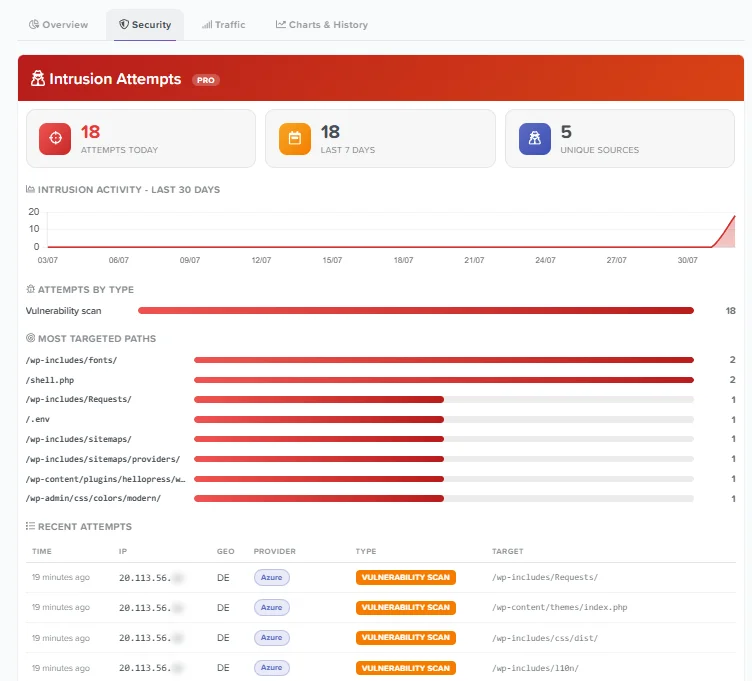
Your forum is being probed. Not occasionally — every single day. Automated scanners look for exposed configuration files, forgotten backups, admin panels and known vulnerabilities, and until now none of that was visible to you.
This release adds a complete forensic layer that records every intrusion attempt, classifies it, and shows you exactly what the attacker was looking for.
Intrusion Attempts — the new forensic panel
Every malicious request is now detected, classified into one of six categories and stored in a dedicated forensic log:
The panel shows attempts today, over the last week, and how many distinct sources are involved, with a 30-day activity chart, a breakdown by attack type, a table of recent attempts with country, hosting provider and AbuseIPDB lookup — and, most revealing of all, a ranking of the paths being targeted most. That ranking tells you at a glance whether you are caught in generic automated sweeps or whether someone is deliberately hunting for XenForo-specific weaknesses.
- Vulnerability scan — probing for configuration files, backups, admin panels or known vulnerable software (.env, .git, wp-admin, phpMyAdmin, exposed installers)
- Credential attack — repeated automated attempts against login and registration endpoints
- SQL injection — attempts to inject database commands through URL parameters
- Path traversal — attempts to escape the web directory and reach system files
- XSS attempt — attempts to inject scripts in order to steal sessions or deface content
- Code injection — attempts to execute commands or load remote code, including Log4j-style JNDI probes
A built-in legend explains what each category means, so you don't need to be a security specialist to read the panel.
Designed against false positives. A forum's URLs contain thread titles, so a discussion called "how to write a SQL select" must never be mistaken for an attack. Injection, XSS and traversal patterns are therefore matched only against query strings, while path probes are matched against the path and exclude XenForo's own routes. The detector was validated against real forum traffic with zero false positives.
Retention under your control. The forensic log has its own retention setting, separate from the general IP log, selectable from 7 to 180 days (30 by default). Attack records are few in number and worth keeping longer, since scanning campaigns often unfold over weeks.
The statistics page is now tabbed
With this much information on one page, scrolling had become tedious. Everything is now organised into four tabs — Overview, Security, Traffic and Charts & History — that switch instantly without reloading. Your last tab is remembered, and you can link directly to a specific tab by adding #tab-security to the page URL.
Live Traffic Radar redesigned
- No more horizontal scrolling — IPv6 addresses are shortened for display (the full address is shown on hover and still used for lookups and bans), and long user-agent strings are truncated to a single line instead of stretching rows over six.
- Hosting provider badge — each address now shows which hosting company or VPN network it belongs to, directly in the radar.
- Consistent styling — the radar now shares its table design with the datacenter and intrusion panels.
- A radar that looks like one — a sweeping light passes across the header, the dish icon pulses, and a live indicator confirms the feed is running. Blocked rows are marked with a red edge.
Stronger Free/Pro separation
Sensitive panel data is no longer merely blurred for unlicensed users — it is never sent to the browser at all. Addresses, targeted paths, provider rankings and detail tables are not even queried without a licence, so there is nothing to reveal by editing the page. Counters and activity charts remain visible to everyone, so every admin can see that something is happening on their board.
This also means unlicensed installations run several fewer database queries per page load.
- Blocked attacks are now recorded — attempts stopped by the shields were exiting the request before reaching the forensic log, meaning the most dangerous attacks were the only ones not being logged.
- Sustained scans are fully captured — logging is no longer suppressed by the block cache, so a scanner probing dozens of paths is recorded in full rather than once. A per-source hourly cap prevents the log from being inflated deliberately.
- Charts inside tabs — graphs and the threat map now redraw correctly when their tab is opened, instead of appearing blank until a page reload.
- Fixed-position elements — the tab animation no longer leaves a transform on its container, which could interfere with tooltips, dropdowns and overlays.
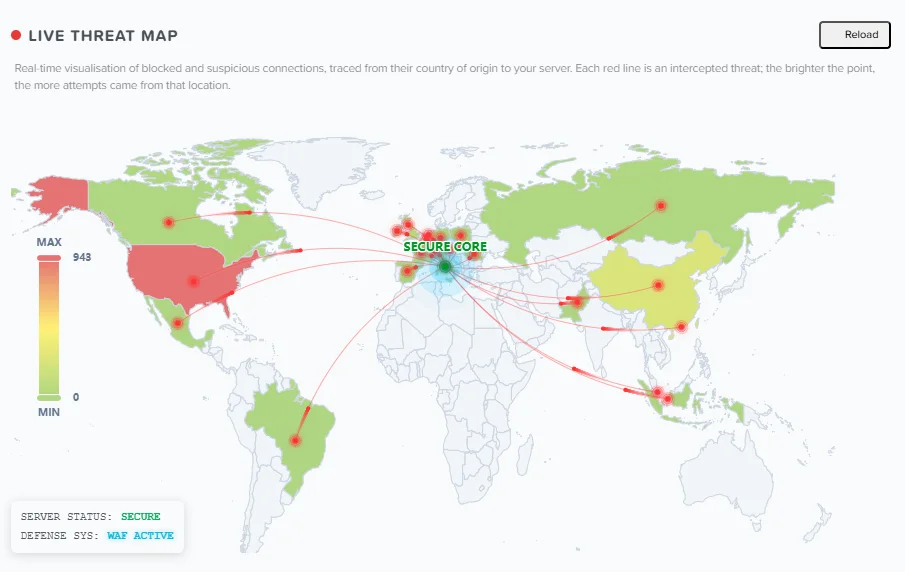
- Threat map — new Reload button that redraws the map and replays the trace animation, plus a short explanation of how to read it. The fullscreen button has been removed, as it conflicted with sidebar layering in some browsers and themes; the map can still be zoomed and panned.
- Explanatory legends added to the datacenter panel, and a duplicated label fixed in the overview.
Enjoy — and let me know what the panel turns up on your board.
- Upload and run the upgrade from the Add-ons page. A new table is created automatically; the upgrade is safe on live boards.
- The forensic panel starts empty and fills as attempts arrive — on a busy board expect the first vulnerability scans within hours.
- Check the new Intrusion log retention setting and pick a value that suits you.
- Detection runs for everyone, including unlicensed installs, so the counters are always real.
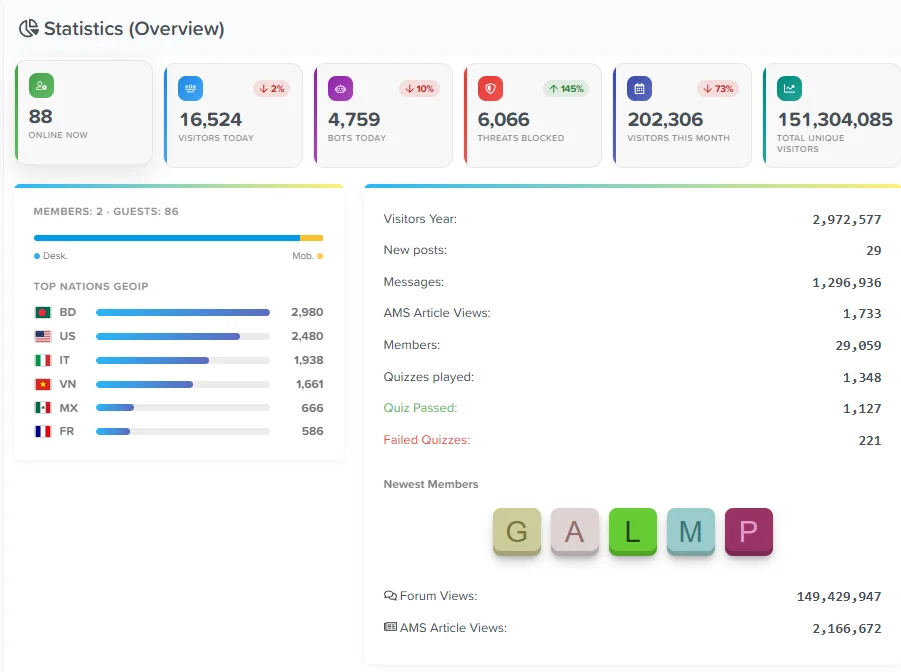
This release redesigns the main dashboard, adds two privacy features, removes the last external CDN request, and fixes a GeoIP loading bug reported by a user. Recommended for everyone.
The overview section has been rebuilt as a proper analytics dashboard:
- KPI cards — Online now, visitors today, bots today, threats blocked, monthly visitors and total unique visitors, each with its own colour-coded icon.
- Trend indicators — Most cards now show how they compare to the previous period: a green arrow with the percentage when a figure is up, a red one when it's down. You can see at a glance whether bot traffic is growing or whether an attack has subsided.
- Country ranking — The GeoIP section now shows a ranked list with proportional bars and visitor counts, instead of just a row of flags.
The hosting provider badge introduced in the Datacenter panel now also appears in the Live Traffic Radar, right under each IP address. You can immediately tell that a suspicious visitor is coming from Tencent Cloud, M247 or DataCamp without leaving the radar. The Datacenter panel has also been moved above the radar, since it's usually what you want to check first.
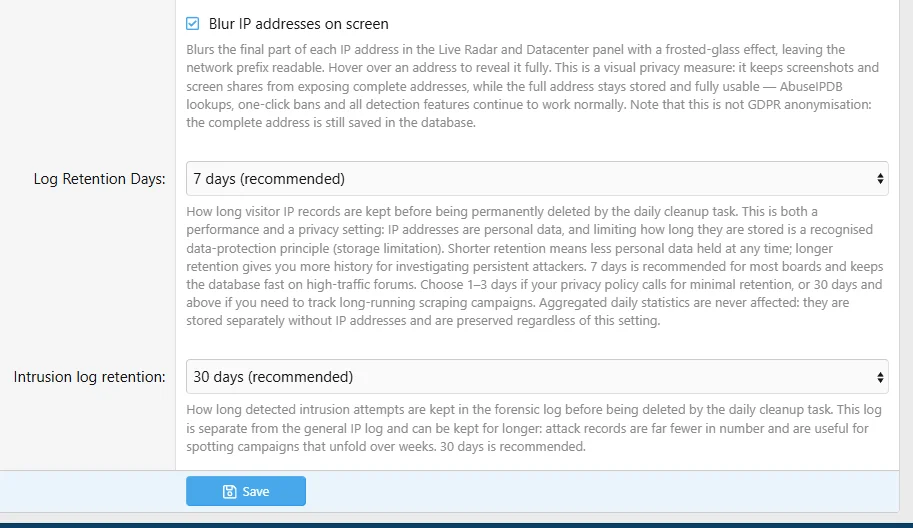
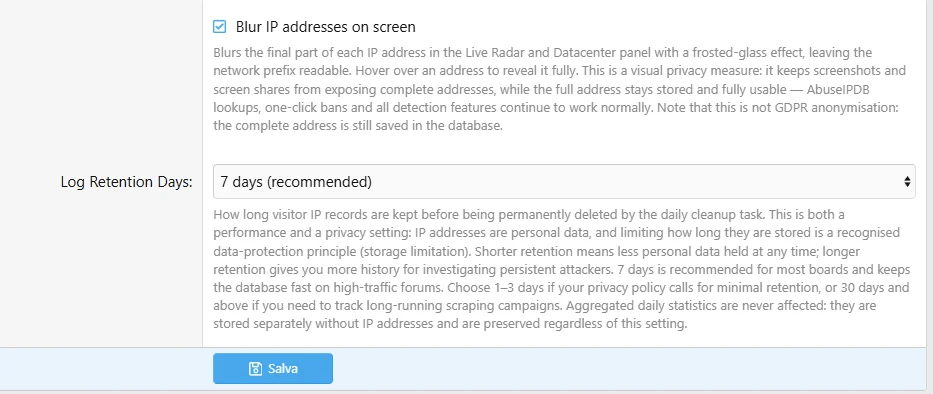
Blur IP addresses on screen (new option)
Blurs the final part of every IP address in the Live Radar and Datacenter panel with a frosted-glass effect, leaving the network prefix readable. Hover over an address to reveal it. This protects screenshots, screen shares and support tickets from exposing complete addresses, while everything keeps working normally — AbuseIPDB lookups, one-click bans and all detection features are unaffected, because the full address is still stored.
IP retention is now a clear choice
The log retention setting has become a dropdown with explicit options from 1 day up to 90 days. IP addresses are personal data, and limiting how long they are kept is a recognised data-protection principle — so this is now presented as the privacy control it actually is, not just a performance tweak.
Importantly, retention only affects the IP log. Your aggregated statistics — monthly and yearly visitors, the 30-day datacenter chart, total hit counts — live in a separate daily archive that contains no IP addresses at all, and are preserved regardless of this setting. You can keep IP records for a single day and still retain years of statistics.
Zero external requests
The charting library and the last remaining flag icons were still being loaded from a public CDN. Both are now served from your own server, alongside the map library and flags that were already local. The add-on now makes no external requests whatsoever: nothing about your visitors leaves your server, and the dashboard loads even if external networks are unreachable.
- GeoIP library loading — On servers without the native MaxMind PHP extension, the bundled reader library could fail to load and throw a fatal error. The library is now loaded through a proper autoloader and validated before use: if it were ever incomplete, GeoIP simply switches off instead of breaking the page. Thanks to the user who reported this.
- Statistics right after midnight — Between midnight and the daily cleanup task, yesterday's figures were missing from the weekly counter, the datacenter chart and the widget's 7-day graph, causing numbers to drop temporarily. Yesterday's data is now calculated live when the archive isn't ready yet.
- Duplicate values — Monthly visitors and total hits were shown twice in the overview; only the KPI card remains.
- Upload and run the upgrade from the Add-ons page as usual. Safe on live boards.
- Check your IP retention setting after upgrading — it's now a dropdown, and it's worth choosing a value that matches your privacy policy.
- The new "Blur IP addresses" option is off by default; enable it if you share screenshots of your dashboard.
- Trend percentages compare against the full previous period, so early in the day or at the start of a month they will naturally show a decrease.
Thanks to everyone reporting issues and suggesting improvements. Enjoy!

This release is all about making your traffic data readable. The Datacenter panel has been completely redesigned, detection coverage has more than doubled, and the sidebar widget gets a brand new animated chart.
Datacenter panel — completely redesigned
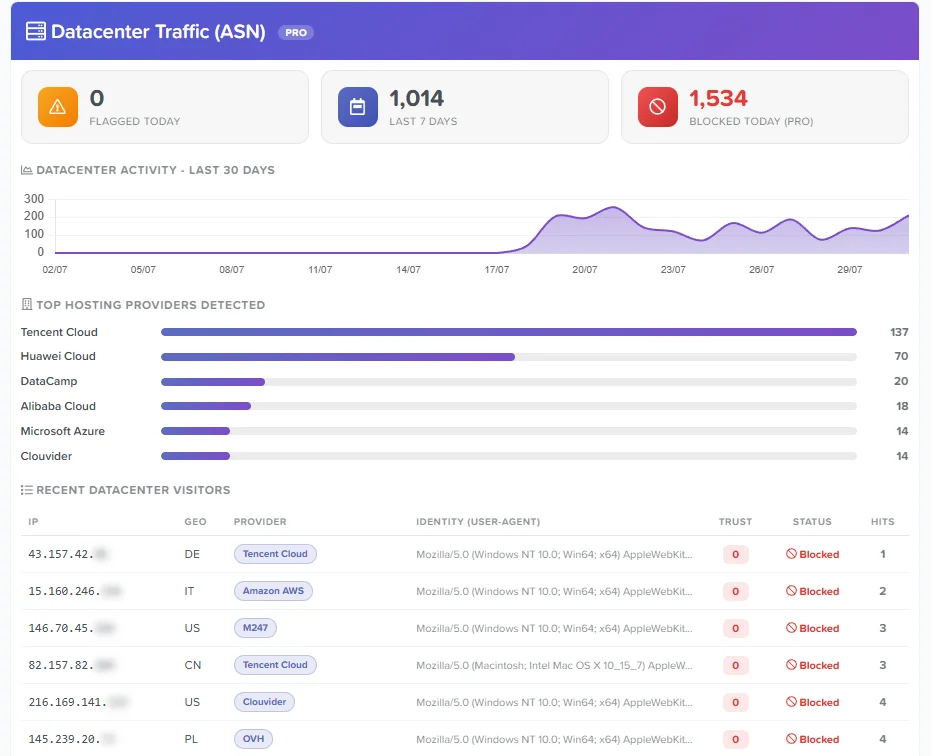
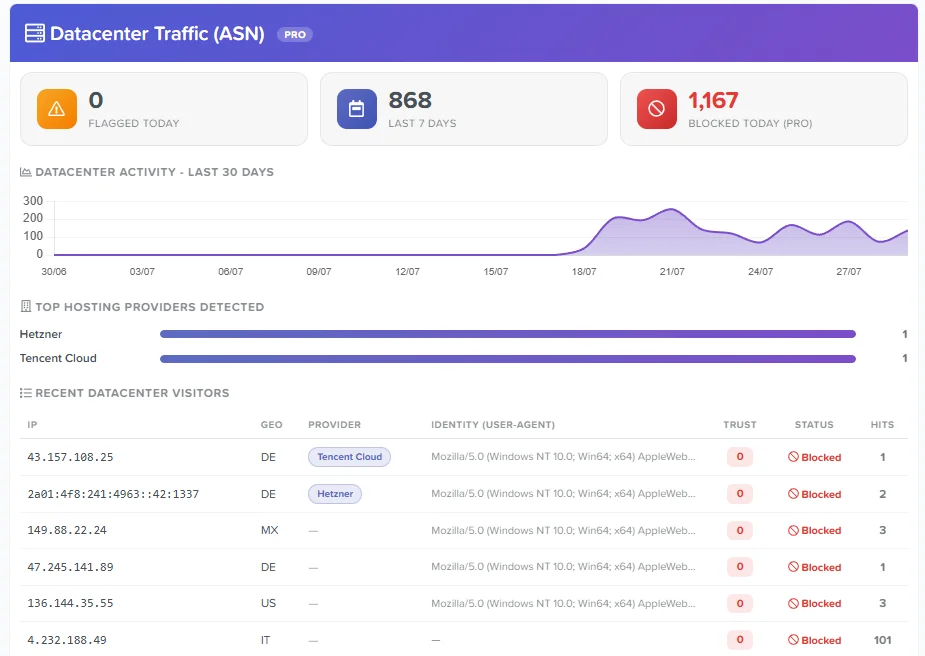
The Datacenter Traffic panel has been rebuilt from the ground up. Instead of plain numbers, you now get a proper intelligence dashboard:
- KPI cards — Flagged today, last 7 days and blocked today, each with its own colour-coded icon.
- 30-day activity chart — A smooth area chart showing how datacenter traffic has evolved over the past month, so you can spot the exact day an attack campaign started.
- Top hosting providers — A ranked bar list of the hosting companies hitting your forum most.
- Provider identification (NEW) — Every detected IP now shows which hosting company or VPN network it belongs to, as a badge in the table. You no longer just know "this is a datacenter bot" — you know it came from DataCamp, M247, Hetzner, and so on.
- Identity column — See the exact user-agent each bot was pretending to be. Very often you'll notice a dozen different IPs all claiming to be the same browser: that's a distributed scraping botnet, and now it's obvious at a glance.
- AbuseIPDB lookup — Every IP in the table is a direct link to its AbuseIPDB reputation report. One click to see who you're dealing with.
The datacenter ASN database has grown from 43 to 110 known hosting and VPN networks. Newly covered providers include Scaleway, netcup, Aruba, LeaseWeb, Hostinger, Alibaba Cloud, Tencent Cloud, Huawei Cloud, Sharktech, ReliableSite, Hostwinds and a range of bulletproof-hosting networks commonly used by scrapers and commercial VPN services.
Note that consumer VPN services running on residential-style networks are deliberately not included — flagging those would risk blocking real members.
Datacenter data in the AI daily report
The automated daily security report now includes datacenter figures: how many datacenter IPs were detected, and which providers dominated. Your AI-generated audit now covers this layer of traffic too.
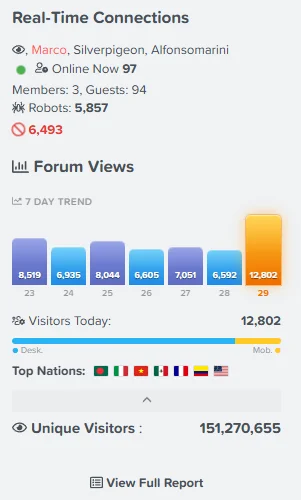
The 7-day trend chart in the widget has been redesigned:
- Intensity-coloured bars — Bar colour now reflects traffic volume relative to the week's peak, from teal on quiet days through blue and indigo up to violet. The colour tells you something instead of just decorating.
- Day labels — Each bar is labelled with its date, and today's bar is highlighted in amber with a soft glow.
- Peak marker — A small gold dot marks the busiest day of the week.
- Smooth animations — Bars grow in sequence on load, and the live counters (online users, today's visitors, blocked threats) count up to their value like a rolling counter.
All animations are pure CSS or lightweight vanilla JavaScript — no libraries, no external requests, negligible overhead. They also respect the operating system's "reduce motion" accessibility setting, so users who prefer a static interface get one automatically.
The Datacenter Intelligence panel is a Pro feature. Free users still see the live counters and the activity chart — so you can tell at a glance whether your forum is being targeted — while IP addresses and identities are masked. Detection itself (the trust-score penalty) remains available to everyone; only the panel details and direct blocking require a licence.
- Upload and run the upgrade from the Add-ons page as usual. A new database column is added automatically; the upgrade is safe on live boards.
- The Provider column fills in going forward. Existing log entries won't show a provider until those IPs are seen again, so expect the badges to appear progressively over the first hours.
- The 30-day chart shows data from the day daily archiving was introduced onward — it will fill out over the coming weeks.
- This release also includes the structural improvement from 1.9.3, where the GeoIP reader library is no longer loaded through a bundled Composer autoloader, making the package lighter and avoiding class conflicts with other add-ons.
As always, thanks to everyone testing and reporting. Enjoy!
A maintenance release that streamlines how the add-on loads its GeoIP library and confirms compatibility with the latest XenForo.
GeoIP library — cleaner loading
The MaxMind reader library is no longer loaded through a bundled Composer autoloader. The add-on now uses the server's native MaxMind support when available, and falls back to a lightweight bundled copy of the reader classes otherwise. This makes the package cleaner and lighter, removes the previous Composer dependency layer, and avoids potential class conflicts with other add-ons that use the same library. GeoIP country resolution works exactly as before on every environment.
Compatibility
Tested and confirmed compatible with XenForo 2.3.12 (the latest release) and 2.3.0+.
How to update
Just upload and run the upgrade from the Add-ons page as usual. No settings or database changes. If you update by overwriting files via FTP, any leftover files from the old vendor/ folder are harmless; if you prefer a clean install, you may delete the old src/addons/Statistiche/vendor/ folder and the composer.json / composer.lock files after running the upgrade — never before, or XenForo will report a missing-autoload error until the upgrade completes.
Advanced Traffic Statistics 1.9.2
A major update to bot protection and reliability, developed across the 1.9.x cycle. It adds a powerful new detection layer against modern scrapers, full Cloudflare / reverse-proxy support, and migrates the GeoIP engine to a freely redistributable database. Everything is summarised below.
Datacenter (ASN) Detection
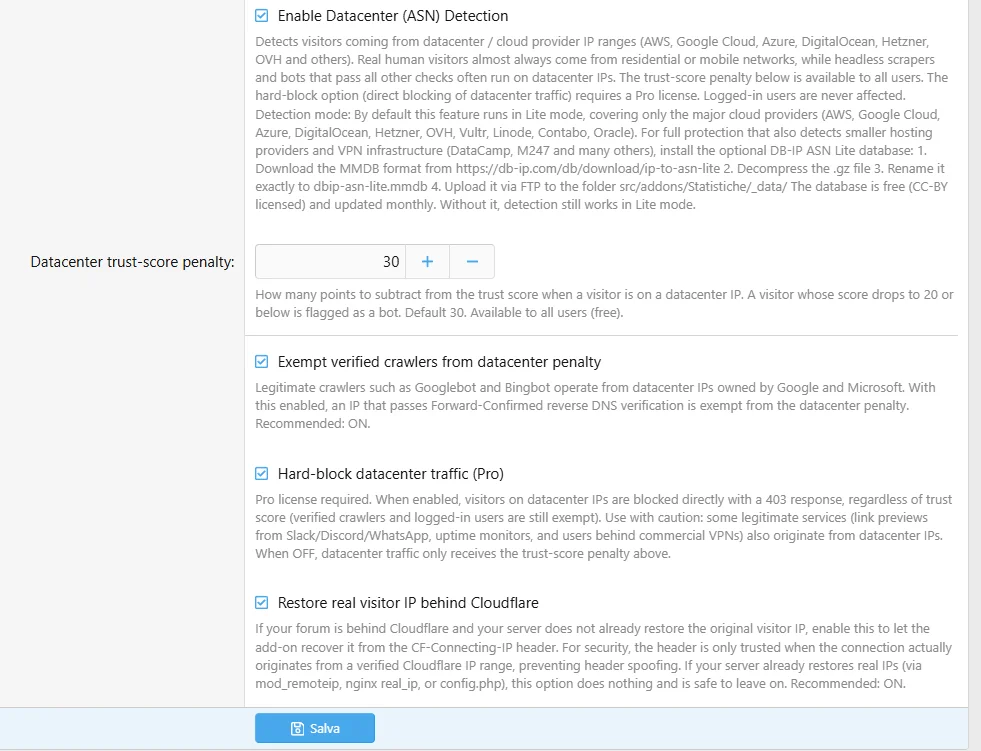
Modern scrapers are hard to catch: they run headless browsers with perfect user-agents and valid headers, sailing past traditional checks. But they almost always run on datacenter IPs, while real visitors come from residential or mobile networks. This turns that into a detection signal.
- Detects datacenter traffic from AWS, Google Cloud, Azure, DigitalOcean, Hetzner, OVH, Vultr, Linode, Contabo, Oracle and more.
- Configurable trust-score penalty — datacenter visitors have their trust score reduced and can be flagged as bots. Available to all users.
- Hard-block mode (Pro) — Pro license holders can block datacenter traffic outright with a 403 response. Off by default.
- Verified crawler exemption — Googlebot, Bingbot and other legitimate crawlers that pass Forward-Confirmed reverse DNS are never penalised, even from datacenter IPs.
- Logged-in users are always exempt — a member on a VPN is never affected.
- Lite & Full modes — works out of the box in Lite mode (major clouds). For full coverage including smaller hosts and VPN infrastructure (DataCamp, M247 and others), an optional free database can be added — instructions are shown right in the option.
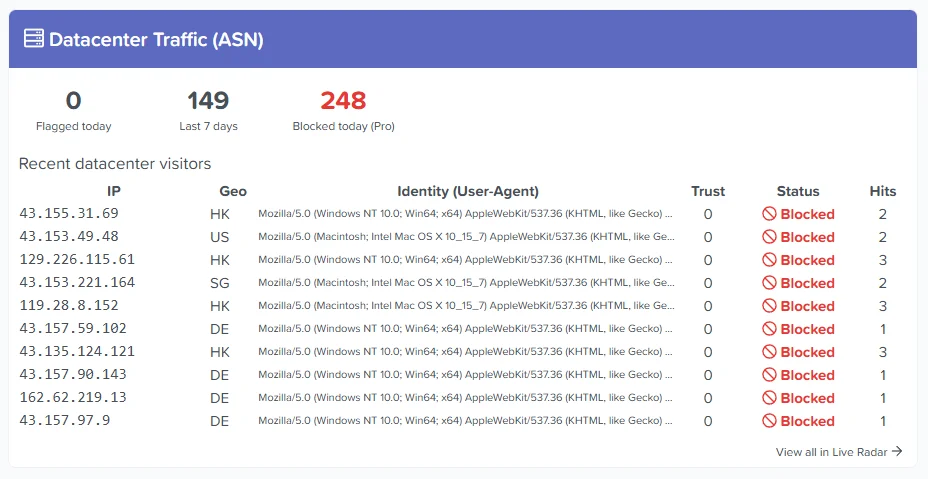
- Dedicated dashboard panel — shows flagged/blocked counts, a persistent 7-day history, and a live table of recent datacenter visitors with country, trust score, block status, hit count, the user-agent they were pretending to be, and a direct AbuseIPDB lookup link on every IP.
Enabling full datacenter protection (optional)
By default, Datacenter Detection runs in Lite mode, covering the major cloud providers (AWS, Google Cloud, Azure, DigitalOcean, Hetzner, OVH, Vultr, Linode, Contabo, Oracle). This already stops most datacenter-based scrapers.
For full protection that also detects smaller hosting providers and VPN infrastructure (DataCamp, M247 and many others), add the optional DB-IP ASN Lite database:
- Download the MMDB format from https://db-ip.com/db/download/ip-to-asn-lite
- Decompress the .gz file
- Rename it exactly to dbip-asn-lite.mmdb
- Upload it via FTP to the folder src/addons/Statistiche/_data/
The database is free (CC-BY licensed) and updated monthly. Without it, detection still works normally in Lite mode. This database is not bundled with the add-on to keep the package lightweight and fully compatible with all hosting environments, including XenForo Cloud.
Cloudflare & reverse proxy support
- Real visitor IP recovery — forums behind Cloudflare now see visitors' real IPs instead of Cloudflare's, so statistics, geolocation and datacenter detection all work correctly. The CF-Connecting-IP header is only trusted when the connection genuinely originates from a verified Cloudflare range, preventing header spoofing.
- Works with existing setups — if your server already restores real IPs (mod_remoteip / nginx real_ip), the add-on detects this and does nothing, avoiding any conflict.
- Admin warning — if the add-on detects it's seeing Cloudflare IPs without the real visitor IP, it alerts the admin with instructions to fix it.
The country database has been migrated to DB-IP Lite (Creative Commons licensed), which can be freely redistributed within the add-on, ensuring full licensing compliance. Attribution is displayed on the statistics page as required. For most users the change is invisible — country detection works exactly as before, and now functions on every hosting environment including XenForo Cloud, with no server configuration or PECL extension required.
- Persistent 7-day statistics — datacenter history is now stored in a daily archive, so the weekly figures stay accurate regardless of how aggressively old logs are pruned. (Note: the 7-day figure fills in progressively over the first week after updating.)
- Cleaner dashboard panel — the recent-visitors table shows the latest entries with a "View all in Live Radar" link for the full list, keeping the panel tidy even when thousands of IPs are blocked.
Removed — Bot Honeypot Trap
The Bot Honeypot Trap has been removed, as it did not deliver the expected results: modern scrapers no longer blindly follow hidden links, so in real-world use it caught virtually nothing. Its role is now filled far more effectively by the new Datacenter Detection above. The related options and template modification are removed automatically on upgrade — no manual cleanup needed.
If you had enabled the honeypot, you can now safely remove these two lines from your robots.txt, as they are no longer used:
โค้ด:Disallow: /statistiche/Basic/trap Disallow: /statistiche/trap
- Upload and run the upgrade from the Add-ons page. Database changes are applied automatically and the upgrade is safe on live boards.
- Datacenter Detection is off by default — enable it when ready, starting with the trust-score penalty before considering hard-block mode.
- If your forum is behind Cloudflare or another CDN, ensure real visitor IPs are being restored (the add-on can do this automatically — see the Cloudflare option in the settings).
- For full datacenter coverage beyond the major clouds, follow the instructions shown in the detection option to add the optional free ASN database.
Thanks to everyone who tested and provided feedback throughout the 1.9.x cycle. Enjoy the update!
Legal Notice
กรุณาปิด โปรแกรมบล๊อกโฆษณา เพราะเราอยู่ได้ด้วยโฆษณาที่ท่านเห็น.
Please close the adblock program. Because we can live with the ads you see.
Please close the adblock program. Because we can live with the ads you see.
กำลังใช้งานบนเว็บไซต์ของเรา
1,042 ผู้ใช้งานขณะนี้
กระทู้
18,709
ข้อความ
20,017
สมาชิก
922
สมาชิกใหม่ล่าสุด
dazza_paul