
![[Ap Yazılım] E-mail Provider Management](/data/resource_icons/0/222.jpg?1793082776)
- เวอร์ชัน XF ที่เข้ากันได้
- 2.3
- ข้อกำหนดเพิ่มเติม
- https://www.thxf.org/resources/ap-yazılım-core-library-english.201/
- การสร้างแบรนด์ที่มองเห็นได้
- ใช่
- VirusTotal reports
- https://www.virustotal.com/gui/file/bcececcf7f45ee1307838dbb20d2f9eb
Developed for your XenForo forum, [Ap Yazılım] Email Provider Management is a premium security and interface add-on that helps prevent invalid or incorrectly formatted email addresses from being accepted during registration and account-related operations, while also providing users with smart autocomplete suggestions. With its advanced administration features, you can control which email domains users are allowed to register with and detect common domain typos to help maintain clean and reliable forum data.
 Key Features
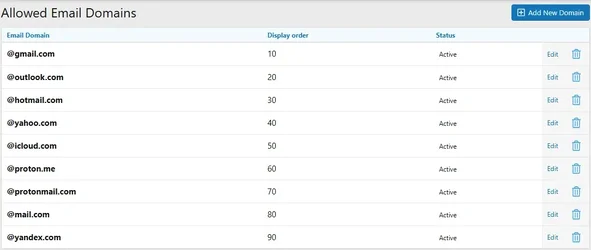
- Manageable Email Domains: Easily add, edit, delete, or temporarily disable allowed email domains (such as gmail.com and hotmail.com) through the Admin Control Panel.
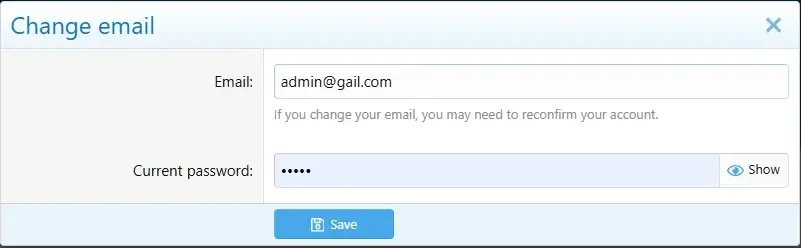
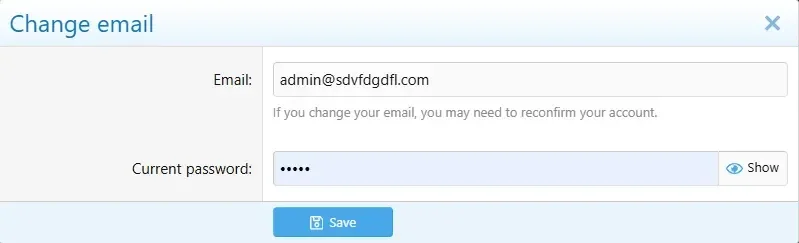
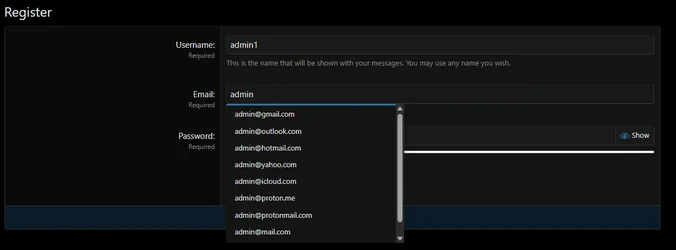
- Smart Email Autocomplete: As users begin typing their email addresses in registration or email change forms, allowed domains appear in a sleek dropdown menu. Clicking a suggestion instantly completes the email address.
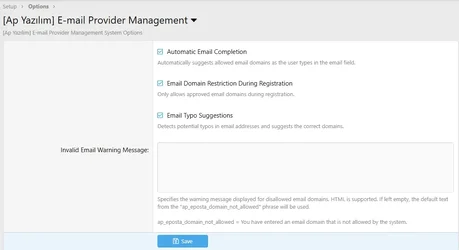
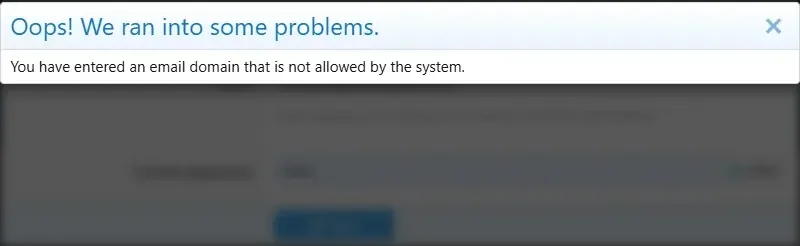
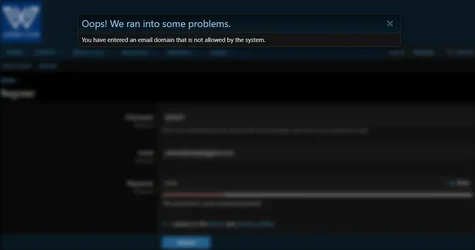
- Strict Server-Side Domain Validation: If users attempt to register with an external or disallowed domain without using the suggestions, the registration process is blocked on the server side, and a custom error message configured through the Admin Control Panel is displayed.
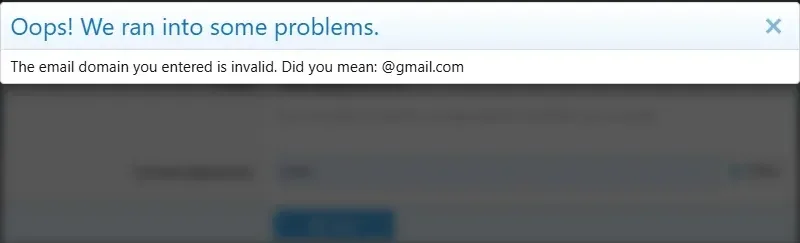
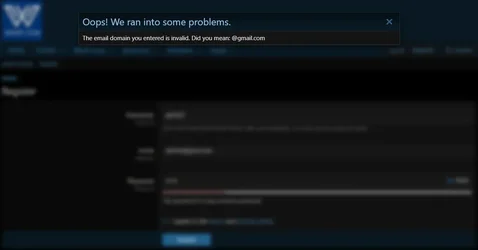
- Email Domain Typo Detection: When users enter potential typos such as gmail.con or gmai.com, the system detects possible mistakes and suggests the correct domain (e.g., "Did you mean: @gmail.com?").
- Global Email Provider Presets (Automatic Seeding): When the add-on is installed, popular global email providers such as Gmail, Outlook, Hotmail, Yahoo, Yandex, iCloud, and Proton are automatically added to the database.
- Multiple Form Support: Autocomplete and domain restrictions work seamlessly not only on the standard registration form but also on email change forms and account management pages.
- Existing Member Protection: Even when domain restrictions are enabled, existing users' email addresses remain unaffected, allowing them to continue using the platform without interruption.
 Settings and Configuration
Manage all add-on features easily through the XenForo Admin Control Panel.- General Settings: Navigate to Admin → Options → [Ap Yazılım] Email Provider Management to enable or disable autocomplete, configure typo detection, and customize error messages.
- Domain Management: Navigate to Admin → Users → Allowed Email Domains to manage the list of domains accepted by the system.
 Why Choose [Ap Yazılım] Email Provider Management?
- Helps reduce registrations from bots and disposable email addresses.
- Minimizes common typing mistakes when users enter their email addresses.
- Makes registration forms more modern and user-friendly with smart autocomplete.
- Provides a lightweight implementation designed to work with XenForo's Entity and Repository architecture.
พัฒนาขึ้นสำหรับฟอรัม XenForo ของคุณ [Ap Yazılım] Email Provider Management เป็นส่วนเสริมด้านความปลอดภัยและอินเทอร์เฟซระดับพรีเมียมที่ช่วยป้องกันไม่ให้ระบบยอมรับที่อยู่อีเมลที่ใช้งานไม่ได้หรือมีรูปแบบไม่ถูกต้องในระหว่างการลงทะเบียนและการดำเนินการที่เกี่ยวข้องกับบัญชี ในขณะเดียวกันก็ให้คำแนะนำการเติมคำอัตโนมัติ (autocomplete) ที่ชาญฉลาดแก่ผู้ใช้ ด้วยคุณลักษณะการจัดการขั้นสูง คุณสามารถควบคุมโดเมนอีเมลที่อนุญาตให้ผู้ใช้ลงทะเบียนได้ และตรวจจับการพิมพ์ผิดในโดเมนทั่วไปเพื่อช่วยรักษาข้อมูลฟอรัมที่สะอาดและเชื่อถือได้
คุณลักษณะเด่น
- การจัดการโดเมนอีเมล: เพิ่ม, แก้ไข, ลบ หรือปิดใช้งานโดเมนอีเมลที่อนุญาต (เช่น gmail.com และ hotmail.com) ได้อย่างง่ายดายผ่านแผงควบคุมผู้ดูแลระบบ (Admin Control Panel)
- การเติมคำอีเมลอัตโนมัติที่ชาญฉลาด: เมื่อผู้ใช้เริ่มพิมพ์ที่อยู่อีเมลในแบบฟอร์มการลงทะเบียนหรือการเปลี่ยนอีเมล โโดเมนที่ได้รับอนุญาตจะปรากฏในเมนูแบบเลื่อนลงที่สวยงาม การคลิกที่คำแนะนำจะเติมที่อยู่อีเมลให้สมบูรณ์ทันที
- การตรวจสอบโดเมนฝั่งเซิร์ฟเวอร์อย่างเข้มงวด: หากผู้ใช้พยายามลงทะเบียนด้วยโดเมนภายนอกหรือไม่ได้รับอนุญาตโดยไม่ใช้คำแนะนำ กระบวนการลงทะเบียนจะถูกบล็อกในฝั่งเซิร์ฟเวอร์ และจะแสดงข้อความแจ้งข้อผิดพลาดที่กำหนดเองซึ่งตั้งค่าผ่านแผงควบคุมผู้ดูแลระบบ
- การตรวจจับการพิมพ์โดเมนอีเมลผิด: เมื่อผู้ใช้พิมพ์ผิด เช่น gmail.con หรือ gmai.com ระบบจะตรวจพบข้อผิดพลาดที่อาจเกิดขึ้นและแนะนำโดเมนที่ถูกต้อง (เช่น "คุณหมายถึง: @gmail.com ใช่หรือไม่?")
- ค่าเริ่มต้นของผู้ให้บริการอีเมลทั่วโลก (การป้อนข้อมูลอัตโนมัติ): เมื่อติดตั้งส่วนเสริม ผู้ให้บริการอีเมลยอดนิยมระดับโลก เช่น Gmail, Outlook, Hotmail, Yahoo, Yandex, iCloud และ Proton จะถูกเพิ่มเข้าไปในฐานข้อมูลโดยอัตโนมัติ
- รองรับหลายแบบฟอร์ม: การเติมคำอัตโนมัติและการจำกัดโดเมนทำงานได้อย่างราบรื่น ไม่เพียงแต่ในแบบฟอร์มการลงทะเบียนมาตรฐานเท่านั้น แต่ยังรวมถึงแบบฟอร์มการเปลี่ยนอีเมลและหน้าการจัดการบัญชีด้วย
- การคุ้มครองสมาชิกเดิม: แม้จะเปิดใช้งานการจำกัดโดเมน แต่ที่อยู่อีเมลของผู้ใช้เดิมจะไม่ได้รับผลกระทบ ช่วยให้พวกเขาสามารถใช้งานแพลตฟอร์มต่อไปได้โดยไม่หยุดชะงัก
การตั้งค่าและการกำหนดค่า
จัดการคุณลักษณะทั้งหมดของส่วนเสริมได้อย่างง่ายดายผ่านแผงควบคุมผู้ดูแลระบบ XenForo- การตั้งค่าทั่วไป: ไปที่ Admin → Options → [Ap Yazılım] Email Provider Management เพื่อเปิดหรือปิดใช้งานการเติมคำอัตโนมัติ กำหนดค่าการตรวจจับการพิมพ์ผิด และปรับแต่งข้อความแจ้งข้อผิดพลาด
- การจัดการโดเมน: ไปที่ Admin → Users → Allowed Email Domains เพื่อจัดการรายการโดเมนที่ระบบยอมรับ
ทำไมต้องเลือก [Ap Yazılım] Email Provider Management?
- ช่วยลดการลงทะเบียนจากบอทและที่อยู่อีเมลแบบใช้แล้วทิ้ง
- ลดข้อผิดพลาดในการพิมพ์ทั่วไปเมื่อผู้ใช้ป้อนที่อยู่อีเมล
- ทำให้แบบฟอร์มการลงทะเบียนดูทันสมัยและเป็นมิตรกับผู้ใช้มากขึ้นด้วยการเติมคำอัตโนมัติที่ชาญฉลาด
- ให้การทำงานที่เบาและรวดเร็วซึ่งออกแบบมาเพื่อทำงานร่วมกับสถาปัตยกรรม Entity และ Repository ของ XenForo
![[Ap Yazılım] Core Library [English]](/data/resource_icons/0/201.jpg?1776233124)

![[Eggy] Virelume](/data/resource_icons/0/220.jpg?1792735830)
![[TH] Featured Threads and Content](/data/resource_icons/0/219.jpg?1789537744)