
- Compatible XF Versions
- 2.3
Key Features of the Plugin
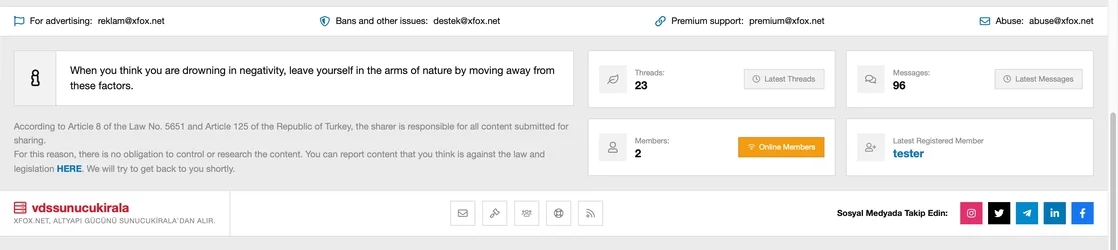
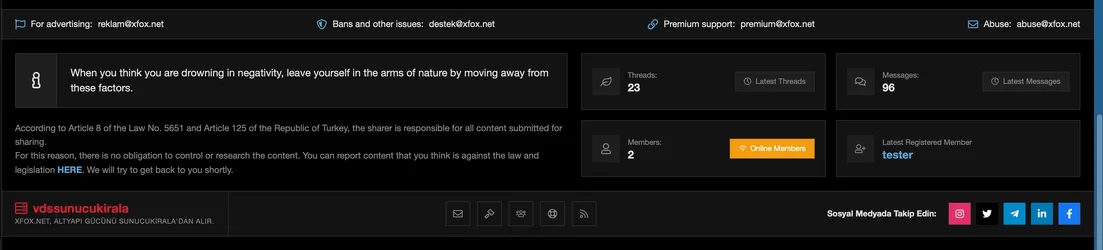
- Header Info / Dialog Bar (Top Bar): Shows your e-mail addresses (Advertisement, Support, etc.) with their icons at the top.
- Information Message Rotator (Text Rotator): It offers an area of information/slogan messages that you can show to your visitors, which changes with soft animations every 10 seconds.
- Dynamic Forum Statistics: Automatically and live pulls the current number of Topics, messages, number members and recently registered members (with the member profile link) in the forum.
- Legal Text: It is a large disclosure area where you can publish legal texts such as disclaimer and copyright in HTML format.
- Quick Links & Social Media Icons: Includes buttons that go to useful pages in the forum (Contact Us, Rules, etc.) and colorful social media icons that redirect to your social network profiles.
- Sponsor / VDS Provider Area: The server or infrastructure offers a special brand area where you can show your sponsor's brand name and slogan.
- Style Harmony: It includes a flexible Less structure that automatically adapts to the color scheme of your XenForo themes (regardless of dark/light theme) instead of fixed colors.
2. Plugin Admin Settings
The settings in the XFox - Custom Footer group under Setup > Options in the XenForo Admin panel are as follows: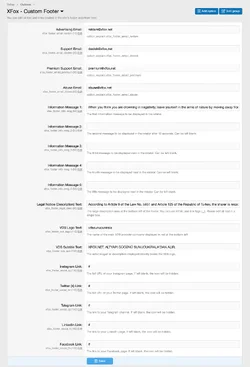
A. Contact E-Mails
- Advertisement Email: E-mail address to be displayed for advertising partnership.
- Support Email: Email address to show for account issues and ban disputes.
- Premium Support Email: Premium support address for private or VIP members.
- Abuse Email: Abuse email for copyrights or complaint notifications.
B. Information Messages (Rotator)
- Information Message 1 - 5: 5 separate text boxes where you can write the messages you want to show alternately. (Blank boxes are not included in the rotation).
C. Description & Sponsor Area
- Legal Notice (Disclosure) Text: Large disclosure area on the left side of the footer. Supports HTML codes (<br>, <a> etc.).
- VDS Logo Text: The main server provider brand name shown in red at the bottom left.
- VDS Subtext: Small slogan or infrastructure description just below the brand name.
D. Social Media Links
- Instagram, Twitter (X), Telegram, LinkedIn, Facebook Links: Full addresses of your pages on relevant social networks (in the form of https://...). Icons of social networks left blank are automatically hidden on the site.

![[XenGenTr] Resimli konu vitrini [English]](/data/resource_icons/0/149.jpg?1749969380)