Summary: this small edit will allow for you to have read & unread post icons (indicators) to the left of the xenforo subforum grid titles.This enhancement is for xf v1.2 and above.
Install: Upload the images in the zip archive to your /icons folder and paste the following into EXTRA.CSS
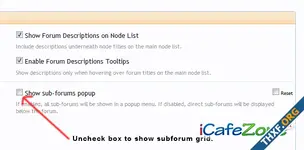
Additional Note: To enable the xenforo subforum grid layout you will need to go into Style Properties >> Forum / Node List & uncheck the checkbox show sub-forum popup box.
Install: Upload the images in the zip archive to your /icons folder and paste the following into EXTRA.CSS
โค้ด:
.subForumList li .nodeTitle:before {
  background: url("@imagePath/xenforo/icons/subforum-read.png") no-repeat left center transparent;
  height: 10px;
  width: 10px;
  content: "";
  padding-left: 12px; }

.subForumList li .unread .nodeTitle:before {
  background: url("@imagePath/xenforo/icons/subforum-unread.png") no-repeat left center transparent;
  height: 10px;
  width: 10px;
  content: "";
  padding-left: 12px; }
Additional Note: To enable the xenforo subforum grid layout you will need to go into Style Properties >> Forum / Node List & uncheck the checkbox show sub-forum popup box.
ไฟล์แนบ