

- เวอร์ชัน XF ที่เข้ากันได้
- 2.3
- ข้อกำหนดเพิ่มเติม
- https://www.thxf.org/resources/ap-yazılım-core-library-english.201/
- VirusTotal reports
- https://www.virustotal.com/gui/file/d04f3cebd78c59d914b097eb27545e8d
Ap-Everyone-1.0.0-en.zip
MD5: d04f3cebd78c59d914b097eb27545e8d
SHA-256: dde52531a5a98b98afe162ac5f702bd4da57631b360025190513e8bc614df074
XenForo forumunuz için geliştirilen [Ap Yazılım] Everyone is an advanced mass-mention plugin that allows you to mention multiple forum members with a single command and automatically send notifications to selected users. Thanks to its smart autocomplete system integrated into the rich text editor, your users can easily use the @everyone command while composing messages. With its advanced administrative options, you can precisely control which users can use this feature, who receives notifications, which forums it is available in, and how notifications are processed.
 Key Features
 Mass Mention with a Single Command
Mention a targeted group of users with a single @everyone command. The system processes the message content and automatically generates notifications for eligible users. You can customize the command through the Admin Control Panel to suit your forum's needs.
 Smart Editor Integration
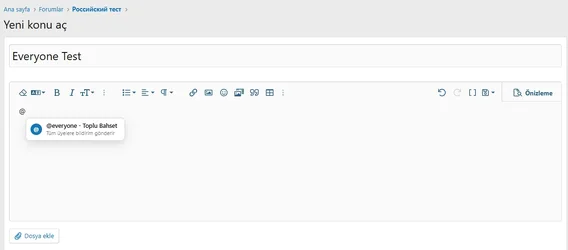
The smart autocomplete system integrates directly with XenForo's rich text editor. When users type @, a suggestion menu displays the Mass Mention option. Users can simply select this option to insert the command into their message.
 Customizable Mention Command
Replace the default @everyone command with a custom alternative. For example, you can use @everyone or configure a different command, such as @members, to suit your forum. You can also configure whether the command is case-sensitive.
 Recipient Count Preview
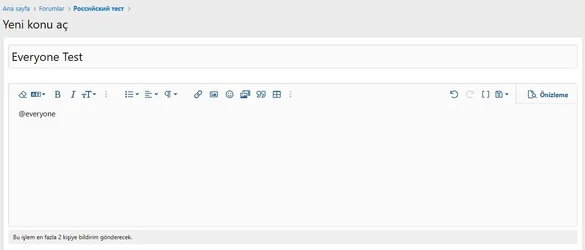
Display the number of users who will receive notifications before a mass-mention operation is processed. The informational message displayed below the editor helps users understand the scope of their action before submitting a message.
 Advanced Recipient Filtering
Limit mass notifications to users who meet specific criteria. For example, you can target members who have reached a certain post count or meet other configured user criteria. If no additional criteria are configured, the system can target all users who satisfy the other eligibility requirements.
 User Group Permissions
Control which user groups can use the mass-mention feature through XenForo's permission system. You can also manage permission to use mass mentions when editing existing messages separately.
 Moderator Approval System
Keep mass mentions under control by requiring moderator approval for selected user groups. This helps prevent unauthorized or excessive mass notifications. You can also configure the maximum number of pending mass-mention messages allowed per user.
 Cooldown Period and Daily Usage Limit
Prevent abuse of the mass-mention feature by configuring cooldown periods and daily usage limits.
Cooldown Period: Defines how long a user must wait between mass-mention operations.
Daily Limit: Restricts the number of mass-mention operations a user can perform within a 24-hour period.
Pending Message Limit: Determines how many mass-mention messages a user can have awaiting moderator approval at the same time.
These limits are managed through user group permissions, allowing you to apply different usage policies to different groups.
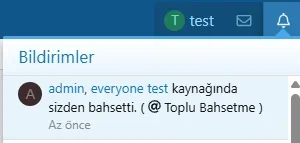
 Native XenForo Notifications
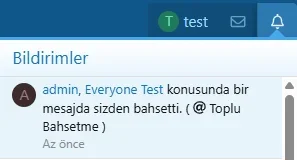
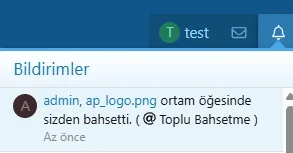
Send notifications to eligible recipients through XenForo's standard notification system. Notifications can appear in the forum's notification menu, helping members stay informed about relevant announcements and discussions.
 Email Notifications
Enable email notifications for mass-mention operations. This allows members who do not regularly visit your forum to stay informed about relevant messages.
 Browser Push Notifications
Enable browser push notifications through XenForo's Web Push infrastructure. This feature works for users with supported browsers who have granted the necessary notification permissions and subscribed to push notifications.
 Forum-Specific Availability
Choose which forums can use the mass-mention feature. Instead of enabling it across your entire forum, you can restrict its availability to specific areas, such as announcement forums, event discussions, or selected discussion categories.
 Resource Manager and Media Gallery Support
In addition to standard forum messages, the plugin can integrate with supported XenForo add-ons.
XenForo Resource Manager (XFRM): Supports use in relevant resource-related content.
XenForo Media Gallery (XFMG): Supports use in relevant media items and comments.
The corresponding XenForo add-ons must be installed and enabled for these integrations to work. Resource and media categories can also be restricted separately.
 Message Editing Support
Control how the system behaves when a mass-mention command is added to an existing message during editing.
You can disable mass mentions during editing, restrict their use to users with the appropriate permissions, or allow all otherwise eligible users to use the feature. This helps prevent uncontrolled notifications from being triggered through message edits.
 Duplicate Notification Grouping
Configure a time interval during which a new mass-mention notification from the same sender can update an existing unread notification for the recipient. This helps reduce notification clutter when multiple mass mentions are sent within a short period.
 Disable Mass-Mention Notifications
Allow users to control whether they receive mass-mention notifications through their account preferences. This gives members greater control over their notification experience.
 Queue-Based Notification Processing
On forums with large user bases, mass notifications can be processed in the background instead of being handled entirely during the page request.
Two processing modes are available:
Immediate Processing: Notifications are processed directly during the operation. This may be suitable for smaller recipient groups.
Queue-Based Processing: Notification tasks are added to the background job queue and processed in batches.
You can configure the number of recipients processed per batch according to your server's capacity. This helps reduce the impact of large notification operations on page response times.
 Mass-Mention Activity Log
Track mass-mention operations through a dedicated administrative log.
The log includes information such as:
The associated thread, resource, media item, or comment.
The user who initiated the mass mention.
The current operation status.
The number of intended notification recipients.
The operation date.
How to UseOnce the plugin is enabled and the required user permissions have been configured, users can use the mass-mention command in supported editor areas.
Example:
Kod:
@everyone
Everyone, please take a moment to review our new announcement!
The default command is everyone. If you configure a different command through the Admin Control Panel, update the example accordingly.
The command is processed only in supported content areas where the system is enabled and the user has the required permissions. Notification recipients are determined by the configured targeting criteria, user preferences, and other eligibility conditions.
Settings and ConfigurationManage the plugin through the XenForo Admin Control Panel.
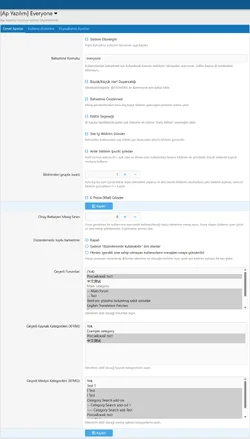
 General Settings
Admin → Options → [Ap Yazılım] Everyone
Configure the plugin's general settings and available notification options.
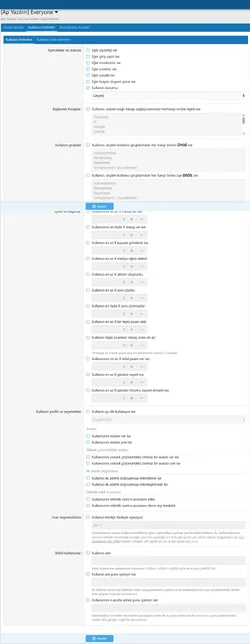
User Group PermissionsAdmin → Groups & Permissions → User Groups
Configure which user groups can use mass mentions, manage editing permissions, control notification preferences, and define usage restrictions.
 Activity Log
Admin → Logs → Mass Mention Log
Review mass-mention operations and monitor their status through the administrative logging interface.
 Why Choose [Ap Yazılım] Everyone?
Mention multiple users and send notifications with a single command.
Make mass mentions easier with rich text editor autocomplete integration.
Restrict recipients using configurable user criteria.
Prevent abuse with cooldown periods, daily limits, and moderator approval.
Support site notifications, email notifications, and browser push notifications.
Integrate with XenForo forum content, Resource Manager, and Media Gallery.
Process large notification operations through the background job queue.
Monitor mass-mention activity through a dedicated administrative log.
Integrate with XenForo's user permissions and account preferences.
Manage the plugin through an organized administrative interface.
[Ap Yazılım] Everyone ที่พัฒนาขึ้นสำหรับฟอรัม XenForo ของคุณ เป็นปลั๊กอินการเอ่ยถึง (mention) จำนวนมากขั้นสูงที่ช่วยให้คุณเอ่ยถึงสมาชิกฟอรัมหลายคนด้วยคำสั่งเดียวและส่งการแจ้งเตือนไปยังผู้ใช้ที่เลือกโดยอัตโนมัติ ด้วยระบบเติมคำอัตโนมัติอัจฉริยะที่รวมเข้ากับโปรแกรมแก้ไขข้อความแบบ rich text ผู้ใช้ของคุณสามารถใช้คำสั่ง @everyone ได้อย่างง่ายดายในขณะที่เขียนข้อความ ด้วยตัวเลือกการดูแลระบบขั้นสูง คุณสามารถควบคุมได้อย่างแม่นยำว่าผู้ใช้รายใดสามารถใช้คุณลักษณะนี้ ใครจะได้รับแจ้งเตือน ฟอรัมใดที่เปิดใช้งานได้ และวิธีการประมวลผลการแจ้งเตือน
คุณสมบัติหลัก เอ่ยถึงจำนวนมากด้วยคำสั่งเดียวเอ่ยถึงกลุ่มผู้ใช้เป้าหมายด้วยคำสั่ง @everyone เพียงคำสั่งเดียว ระบบจะประมวลผลเนื้อหาข้อความและสร้างการแจ้งเตือนสำหรับผู้ใช้ที่มีสิทธิ์โดยอัตโนมัติ คุณสามารถปรับแต่งคำสั่งผ่านแผงควบคุมผู้ดูแลระบบ (Admin Control Panel) เพื่อให้เหมาะกับความต้องการของฟอรัมคุณ
การรวมเข้ากับตัวแก้ไขอัจฉริยะระบบเติมคำอัตโนมัติอัจฉริยะรวมเข้ากับโปรแกรมแก้ไขข้อความแบบ rich text ของ XenForo โดยตรง เมื่อผู้ใช้พิมพ์ @ เมนูแนะนำจะแสดงตัวเลือก Mass Mention ผู้ใช้สามารถเลือกตัวเลือกนี้เพื่อใส่คำสั่งลงในข้อความได้อย่างง่ายดาย
ปรับแต่งคำสั่งเอ่ยถึงได้แทนที่คำสั่ง @everyone เริ่มต้นด้วยตัวเลือกที่กำหนดเอง ตัวอย่างเช่น คุณสามารถใช้ @everyone หรือกำหนดค่าคำสั่งอื่น เช่น @members เพื่อให้เหมาะกับฟอรัมของคุณ นอกจากนี้คุณยังสามารถกำหนดค่าได้ว่าคำสั่งนั้นจะแยกแยะตัวพิมพ์เล็ก-ใหญ่หรือไม่
แสดงตัวอย่างจำนวนผู้รับแสดงจำนวนผู้ใช้ที่จะได้รับการแจ้งเตือนก่อนที่จะประมวลผลการเอ่ยถึงจำนวนมาก ข้อความข้อมูลที่แสดงด้านล่างตัวแก้ไขช่วยให้ผู้ใช้เข้าใจขอบเขตของการดำเนินการก่อนที่จะส่งข้อความ
การกรองผู้รับขั้นสูงจำกัดการแจ้งเตือนจำนวนมากเฉพาะผู้ใช้ที่ตรงตามเกณฑ์ที่กำหนด ตัวอย่างเช่น คุณสามารถกำหนดเป้าหมายสมาชิกที่มีจำนวนโพสต์ถึงระดับที่กำหนด หรือตรงตามเกณฑ์ผู้ใช้อื่นๆ ที่กำหนดค่าไว้ หากไม่ได้กำหนดเกณฑ์เพิ่มเติม ระบบสามารถกำหนดเป้าหมายผู้ใช้ทั้งหมดที่ตรงตามข้อกำหนดสิทธิ์อื่นๆ ได้
สิทธิ์ของกลุ่มผู้ใช้ควบคุมว่ากลุ่มผู้ใช้ใดสามารถใช้คุณลักษณะการเอ่ยถึงจำนวนมากผ่านระบบสิทธิ์ของ XenForo นอกจากนี้คุณยังสามารถจัดการสิทธิ์ในการใช้การเอ่ยถึงจำนวนมากเมื่อแก้ไขข้อความที่มีอยู่แยกต่างหาก
ระบบอนุมัติโดยผู้ดูแลควบคุมการเอ่ยถึงจำนวนมากโดยกำหนดให้ต้องมีการอนุมัติจากผู้ดูแลสำหรับกลุ่มผู้ใช้ที่เลือก วิธีนี้ช่วยป้องกันการแจ้งเตือนจำนวนมากที่ไม่ได้รับอนุญาตหรือเกินความจำเป็น คุณยังสามารถกำหนดจำนวนสูงสุดของข้อความการเอ่ยถึงจำนวนมากที่รอการอนุมัติซึ่งอนุญาตต่อผู้ใช้หนึ่งรายได้
ระยะเวลารอคอยและขีดจำกัดการใช้งานรายวันป้องกันการใช้คุณลักษณะการเอ่ยถึงจำนวนมากในทางที่ผิดโดยการกำหนดค่าระยะเวลารอคอยและขีดจำกัดการใช้งานรายวัน
ระยะเวลารอคอย: กำหนดระยะเวลาที่ผู้ใช้ต้องรอระหว่างการดำเนินการเอ่ยถึงจำนวนมาก
ขีดจำกัดรายวัน: จำกัดจำนวนครั้งในการดำเนินการเอ่ยถึงจำนวนมากที่ผู้ใช้สามารถทำได้ภายในระยะเวลา 24 ชั่วโมง
ขีดจำกัดข้อความที่รอดำเนินการ: กำหนดจำนวนข้อความการเอ่ยถึงจำนวนมากที่ผู้ใช้สามารถมีค้างรอการอนุมัติจากผู้ดูแลในเวลาเดียวกันได้
ขีดจำกัดเหล่านี้ได้รับการจัดการผ่านสิทธิ์ของกลุ่มผู้ใช้ ช่วยให้คุณสามารถใช้นโยบายการใช้งานที่แตกต่างกันกับกลุ่มต่างๆ ได้
การแจ้งเตือนดั้งเดิมของ XenForoส่งการแจ้งเตือนไปยังผู้รับที่มีสิทธิ์ผ่านระบบการแจ้งเตือนมาตรฐานของ XenForo การแจ้งเตือนสามารถปรากฏในเมนูการแจ้งเตือนของฟอรัม ช่วยให้สมาชิกทราบเกี่ยวกับประกาศและการสนทนาที่เกี่ยวข้อง
การแจ้งเตือนทางอีเมลเปิดใช้งานการแจ้งเตือนทางอีเมลสำหรับการดำเนินการเอ่ยถึงจำนวนมาก สิ่งนี้ช่วยให้สมาชิกที่ไม่ได้เข้าชมฟอรัมของคุณเป็นประจำสามารถรับทราบข้อมูลเกี่ยวกับข้อความที่เกี่ยวข้องได้
การแจ้งเตือนแบบ Push บนเบราว์เซอร์เปิดใช้งานการแจ้งเตือนแบบ Push บนเบราว์เซอร์ผ่านโครงสร้างพื้นฐาน Web Push ของ XenForo คุณลักษณะนี้ใช้งานได้กับผู้ใช้ที่ใช้เบราว์เซอร์ที่รองรับ ซึ่งได้รับสิทธิ์การแจ้งเตือนที่จำเป็นและสมัครรับข้อมูลการแจ้งเตือนแบบ Push แล้ว
การเปิดใช้งานเฉพาะฟอรัมเลือกฟอรัมที่สามารถใช้คุณลักษณะการเอ่ยถึงจำนวนมากได้ แทนที่จะเปิดใช้งานทั่วทั้งฟอรัม คุณสามารถจำกัดการใช้งานไว้เฉพาะบางพื้นที่ เช่น ฟอรัมประกาศ การสนทนากิจกรรม หรือหมวดหมู่การสนทนาที่เลือก
รองรับ Resource Manager และ Media Galleryนอกเหนือจากข้อความฟอรัมมาตรฐานแล้ว ปลั๊กอินยังสามารถรวมเข้ากับส่วนเสริมของ XenForo ที่รองรับได้
XenForo Resource Manager (XFRM): รองรับการใช้งานในเนื้อหาที่เกี่ยวข้องกับทรัพยากร
XenForo Media Gallery (XFMG): รองรับการใช้งานในรายการสื่อและความคิดเห็นที่เกี่ยวข้อง
ต้องติดตั้งและเปิดใช้งานส่วนเสริม XenForo ที่เกี่ยวข้องเพื่อให้การทำงานร่วมกันเหล่านี้ทำงานได้ นอกจากนี้ยังสามารถจำกัดหมวดหมู่ทรัพยากรและสื่อแยกกันได้
รองรับการแก้ไขข้อความควบคุมพฤติกรรมของระบบเมื่อมีการเพิ่มคำสั่งเอ่ยถึงจำนวนมากลงในข้อความที่มีอยู่ระหว่างการแก้ไข
คุณสามารถปิดใช้งานการเอ่ยถึงจำนวนมากระหว่างการแก้ไข จำกัดการใช้งานสำหรับผู้ใช้ที่มีสิทธิ์ที่เหมาะสม หรืออนุญาตให้ผู้ใช้ที่มีสิทธิ์คนอื่นๆ ทั้งหมดใช้คุณลักษณะนี้ได้ วิธีนี้ช่วยป้องกันไม่ให้เกิดการแจ้งเตือนที่ควบคุมไม่ได้จากการแก้ไขข้อความ
การจัดกลุ่มการแจ้งเตือนที่ซ้ำกันกำหนดค่าช่วงเวลาที่การแจ้งเตือนการเอ่ยถึงจำนวนมากใหม่จากผู้ส่งคนเดียวกันสามารถอัปเดตการแจ้งเตือนที่ยังไม่ได้อ่านที่มีอยู่สำหรับผู้รับได้ สิ่งนี้ช่วยลดความวุ่นวายของการแจ้งเตือนเมื่อมีการส่งการเอ่ยถึงจำนวนมากหลายครั้งในช่วงเวลาสั้นๆ
ปิดการแจ้งเตือนการเอ่ยถึงจำนวนมากอนุญาตให้ผู้ใช้ควบคุมว่าต้องการรับการแจ้งเตือนการเอ่ยถึงจำนวนมากหรือไม่ผ่านการตั้งค่าบัญชีของตนเอง สิ่งนี้ช่วยให้สมาชิกควบคุมประสบการณ์การแจ้งเตือนของตนได้ดียิ่งขึ้น
การประมวลผลการแจ้งเตือนตามคิวในฟอรัมที่มีฐานผู้ใช้ขนาดใหญ่ การแจ้งเตือนจำนวนมากสามารถประมวลผลในเบื้องหลังแทนที่จะจัดการทั้งหมดระหว่างการร้องขอหน้าเว็บ
มีโหมดการประมวลผลให้เลือกสองโหมด:
การประมวลผลทันที: การแจ้งเตือนจะได้รับการประมวลผลโดยตรงระหว่างการดำเนินการ ซึ่งอาจเหมาะสำหรับกลุ่มผู้รับขนาดเล็ก
การประมวลผลตามคิว: งานการแจ้งเตือนจะถูกเพิ่มลงในคิวงานเบื้องหลังและประมวลผลเป็นชุดๆ
คุณสามารถกำหนดจำนวนผู้รับที่จะประมวลผลต่อชุดตามความจุของเซิร์ฟเวอร์ของคุณ ซึ่งจะช่วยลดผลกระทบของการแจ้งเตือนขนาดใหญ่ที่มีต่อเวลาตอบสนองของหน้าเว็บ
บันทึกกิจกรรมการเอ่ยถึงจำนวนมากติดตามการดำเนินการเอ่ยถึงจำนวนมากผ่านบันทึกการดูแลระบบโดยเฉพาะ
บันทึกประกอบด้วยข้อมูลต่างๆ เช่น:
เธรด ทรัพยากร รายการสื่อ หรือความคิดเห็นที่เกี่ยวข้อง
ผู้ใช้ที่เริ่มการเอ่ยถึงจำนวนมาก
สถานะการดำเนินการปัจจุบัน
จำนวนผู้รับการแจ้งเตือนที่ตั้งเป้าไว้
วันที่ดำเนินการ
วิธีการใช้งานเมื่อเปิดใช้งานปลั๊กอินและกำหนดค่าสิทธิ์ของผู้ใช้ที่จำเป็นแล้ว ผู้ใช้สามารถใช้คำสั่งเอ่ยถึงจำนวนมากในพื้นที่ตัวแก้ไขที่รองรับ
ตัวอย่าง:
โค้ด:
@everyone
ทุกคน โปรดสละเวลาสักครู่เพื่อตรวจสอบประกาศใหม่ของเรา!
คำสั่งเริ่มต้นคือ everyone หากคุณกำหนดค่าคำสั่งอื่นผ่านแผงควบคุมผู้ดูแลระบบ โปรดอัปเดตตัวอย่างตามความเหมาะสม
คำสั่งจะถูกประมวลผลเฉพาะในพื้นที่เนื้อหาที่รองรับซึ่งระบบเปิดใช้งานอยู่และผู้ใช้มีสิทธิ์ที่จำเป็นเท่านั้น ผู้รับการแจ้งเตือนจะถูกกำหนดโดยเกณฑ์การกำหนดเป้าหมายที่กำหนดค่าไว้ การตั้งค่าผู้ใช้ และเงื่อนไขสิทธิ์อื่นๆ
การตั้งค่าและการกำหนดค่าจัดการปลั๊กอินผ่านแผงควบคุมผู้ดูแลระบบ XenForo
การตั้งค่าทั่วไปผู้ดูแลระบบ → ตัวเลือก → [Ap Yazılım] Everyone
กำหนดค่าการตั้งค่าทั่วไปของปลั๊กอินและตัวเลือกการแจ้งเตือนที่พร้อมใช้งาน
สิทธิ์ของกลุ่มผู้ใช้ผู้ดูแลระบบ → กลุ่มและสิทธิ์ → กลุ่มผู้ใช้
กำหนดค่าว่ากลุ่มผู้ใช้ใดสามารถใช้การเอ่ยถึงจำนวนมาก จัดการสิทธิ์การแก้ไข ควบคุมการตั้งค่าการแจ้งเตือน และกำหนดข้อจำกัดการใช้งาน
บันทึกกิจกรรมผู้ดูแลระบบ → บันทึก → Mass Mention Log
ตรวจสอบการดำเนินการเอ่ยถึงจำนวนมากและติดตามสถานะผ่านอินเทอร์เฟซการบันทึกการดูแลระบบ
ทำไมต้องเลือก [Ap Yazılım] Everyone?เอ่ยถึงผู้ใช้หลายคนและส่งการแจ้งเตือนด้วยคำสั่งเดียว
ทำให้การเอ่ยถึงจำนวนมากง่ายขึ้นด้วยการรวมการเติมคำอัตโนมัติในโปรแกรมแก้ไข rich text
จำกัดผู้รับโดยใช้เกณฑ์ผู้ใช้ที่กำหนดค่าได้
ป้องกันการใช้งานในทางที่ผิดด้วยระยะเวลารอคอย ขีดจำกัดรายวัน และการอนุมัติจากผู้ดูแล
รองรับการแจ้งเตือนในไซต์ การแจ้งเตือนทางอีเมล และการแจ้งเตือนแบบ push บนเบราว์เซอร์
รวมเข้ากับเนื้อหาฟอรัม XenForo, Resource Manager และ Media Gallery
ประมวลผลการแจ้งเตือนขนาดใหญ่ผ่านคิวงานเบื้องหลัง
ตรวจสอบกิจกรรมการเอ่ยถึงจำนวนมากผ่านบันทึกการดูแลระบบโดยเฉพาะ
รวมเข้ากับสิทธิ์ของผู้ใช้และการตั้งค่าบัญชีของ XenForo
จัดการปลั๊กอินผ่านอินเทอร์เฟซการดูแลระบบที่เป็นระเบียบ


