Apple MacBook Pro 2020 M1, 16 GB, Sonoma 14.8
Documentation based on comments in this Github Elasticsearch issue and my self issue.Install Homebrew
Install Elasticsearch 7.17.4 and OpenJDK@21
Bash:
brew tap elastic/tap
brew install elastic/tap/elasticsearch-full
brew install openjdk@21
Symlink OpenJDK so the system Java wrappers can find it. This information is also displayed as a Homebrew "caveat" after installing OpenJDK.
Bash:
sudo ln -sfn /usr/local/Cellar/openjdk@21/libexec/openjdk.jdk /Library/Java/JavaVirtualMachines/openjdk-21.jdkModify Elasticsearch .plist to use the OpenJDK
Edit Elasticsearchhomebrew.mxcl.elasticsearch-full.plist to use the OpenJDK:/usr/local/Cellar/elasticsearch-full/7.17.4/homebrew.mxcl.elasticsearch-full.plistFind the full path to OpenJDK:
/usr/libexec/java_homeInsert the following before the last closing </dict>:
โค้ด:
    <key>EnvironmentVariables</key>
    <dict>
      <key>ES_JAVA_HOME</key>
      <string>insert the full path from /usr/libexec/java_home here</string>
    </dict>
AppleScript:
<?xml version="1.0" encoding="UTF-8"?>
<!DOCTYPE plist PUBLIC "-//Apple//DTD PLIST 1.0//EN" "http://www.apple.com/DTDs/PropertyList-1.0.dtd">
<plist version="1.0">
  <dict>
    <key>KeepAlive</key>
    <false/>
    <key>Label</key>
    <string>homebrew.mxcl.elasticsearch-full</string>
    <key>ProgramArguments</key>
    <array>
      <string>/opt/homebrew/opt/elasticsearch-full/bin/elasticsearch</string>
    </array>
    <key>EnvironmentVariables</key>
    <dict>
    </dict>
    <key>RunAtLoad</key>
    <true/>
    <key>WorkingDirectory</key>
    <string>/opt/homebrew/var</string>
    <key>StandardErrorPath</key>
    <string>/opt/homebrew/var/log/elasticsearch.log</string>
    <key>StandardOutPath</key>
    <string>/opt/homebrew/var/log/elasticsearch.log</string>
    <key>EnvironmentVariables</key>
    <dict>
      <key>ES_JAVA_HOME</key>
      <string>/usr/local/Cellar/openjdk@21/21.0.8/libexec/openjdk.jdk/Contents/Home</string>
    </dict>
  </dict>
</plist>
Modify Elasticsearch YML
Bash:
echo "\nxpack.ml.enabled: false\n" >> /opt/homebrew/etc/elasticsearch/elasticsearch.ymlSet ES_JAVA_HOME
Add the ES_JAVA_HOME environment variable by setting to ~/.zshrc:
Bash:
echo "\nexport ES_JAVA_HOME=$(/usr/libexec/java_home)\n" >> ~/.zshrcRun and Test Elasticsearch
In a new shell, launch Elasticsearch:
Bash:
brew services start elasticsearch-full
Bash:
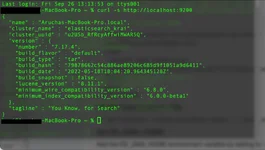
curl -s http://localhost:9200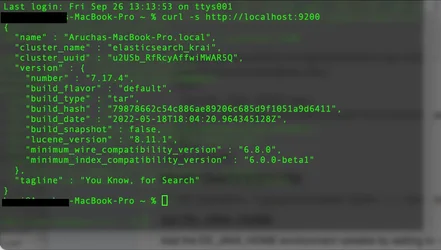
Apple MacBook Pro 2020 M1, 16 GB, Sonoma 14.8
เอกสารนี้อ้างอิงจากความคิดเห็นใน Github Elasticsearch issue นี้ และปัญหาที่ฉันพบด้วยตัวเองติดตั้ง Homebrew
ติดตั้ง Elasticsearch 7.17.4 และ OpenJDK@21
Bash:
brew tap elastic/tap
brew install elastic/tap/elasticsearch-full
brew install openjdk@21
สร้าง Symlink สำหรับ OpenJDK เพื่อให้ Java wrappers ของระบบสามารถค้นหาพบได้ ข้อมูลนี้จะแสดงเป็นคำแนะนำเพิ่มเติม ("caveat") ของ Homebrew หลังจากติดตั้ง OpenJDK เช่นกัน
Bash:
sudo ln -sfn /usr/local/Cellar/openjdk@21/libexec/openjdk.jdk /Library/Java/JavaVirtualMachines/openjdk-21.jdkแก้ไขไฟล์ .plist ของ Elasticsearch เพื่อให้ใช้งาน OpenJDK
แก้ไขไฟล์homebrew.mxcl.elasticsearch-full.plist ของ Elasticsearch เพื่อใช้งาน OpenJDK:/usr/local/Cellar/elasticsearch-full/7.17.4/homebrew.mxcl.elasticsearch-full.plistค้นหาพาธแบบเต็ม (full path) ของ OpenJDK:
/usr/libexec/java_homeแทรกข้อความต่อไปนี้ก่อนแท็กปิด </dict> ตัวสุดท้าย:
โค้ด:
    <key>EnvironmentVariables</key>
    <dict>
      <key>ES_JAVA_HOME</key>
      <string>ใส่พาธแบบเต็มจาก /usr/libexec/java_home ที่นี่</string>
    </dict>
AppleScript:
<?xml version="1.0" encoding="UTF-8"?>
<!DOCTYPE plist PUBLIC "-//Apple//DTD PLIST 1.0//EN" "http://www.apple.com/DTDs/PropertyList-1.0.dtd">
<plist version="1.0">
  <dict>
    <key>KeepAlive</key>
    <false/>
    <key>Label</key>
    <string>homebrew.mxcl.elasticsearch-full</string>
    <key>ProgramArguments</key>
    <array>
      <string>/opt/homebrew/opt/elasticsearch-full/bin/elasticsearch</string>
    </array>
    <key>EnvironmentVariables</key>
    <dict>
    </dict>
    <key>RunAtLoad</key>
    <true/>
    <key>WorkingDirectory</key>
    <string>/opt/homebrew/var</string>
    <key>StandardErrorPath</key>
    <string>/opt/homebrew/var/log/elasticsearch.log</string>
    <key>StandardOutPath</key>
    <string>/opt/homebrew/var/log/elasticsearch.log</string>
    <key>EnvironmentVariables</key>
    <dict>
      <key>ES_JAVA_HOME</key>
      <string>/usr/local/Cellar/openjdk@21/21.0.8/libexec/openjdk.jdk/Contents/Home</string>
    </dict>
  </dict>
</plist>
แก้ไขไฟล์ YML ของ Elasticsearch
Bash:
echo "\nxpack.ml.enabled: false\n" >> /opt/homebrew/etc/elasticsearch/elasticsearch.ymlตั้งค่า ES_JAVA_HOME
เพิ่มตัวแปรสภาพแวดล้อม (environment variable) ES_JAVA_HOME โดยตั้งค่าใน ~/.zshrc:
Bash:
echo "\nexport ES_JAVA_HOME=$(/usr/libexec/java_home)\n" >> ~/.zshrcรันและทดสอบ Elasticsearch
ในหน้าต่างเชลล์ใหม่ ให้เริ่มรัน Elasticsearch:
Bash:
brew services start elasticsearch-full
Bash:
curl -s http://localhost:9200
แก้ไขล่าสุด: